How hard would it be to leave AWS?
The AWS Regulatory Risk Review Framework answers that for a whole AWS Organizational Unit, in a form an executive committee can act on: one exit-risk score weighted by where the money is spent, the services and accounts that drive it, and an indicative cost and time to exit. The same scan also produces the Cloud Assurance Framework Report: every account scored against 139 controls in 13 areas. Everything is read-only, and it runs on your own machine.
- Install and first scaninstall
- AWS accessaccess
- The exit-risk reportreport
- Exit model questionsexit-model
- Multi-regionmulti-region
- Cloud Assurance reportassurance
- Agentic Risk Reviewai-review
- PDF and exportsexports
- Command linecli
- How the score worksscore
- Uninstalluninstall
Regulatory Risk, the missing pillar.
The AWS Well-Architected Framework has six pillars: Operational Excellence, Security, Reliability, Performance Efficiency, Cost Optimization and Sustainability. They describe a workload that runs well on AWS. None of them asks the question a regulator asks first: could you leave if you had to?
For banks, insurers, payment providers, market infrastructure and healthcare, that question is not optional. Running material workloads in the cloud is outsourcing, and outsourcing rules require a documented, credible and tested exit strategy:
Exit strategies for ICT third-party services supporting critical or important functions, tested and documented.
EBA Guidelines on outsourcing (EBA/GL/2019/02)
Documented exit plans, with an assessment of how complex and costly exit would be.
Stressed exit plans for material outsourcing, including alternative providers and timelines.
Exit plans for material service providers, so critical operations continue if the provider fails or the arrangement ends.
SARB Prudential Authority Directive 3/2018 and Guidance Note G5/2018
Exit and contingency arrangements for material cloud usage (cloud computing and offshoring of data).
The framework proposes Regulatory Risk as the seventh pillar: the measured degree to which your architecture keeps you free to exit, change providers, or bring workloads back in house. Like the other pillars, it is a design property you can measure, track and improve.
Measure it
A spend-weighted 0 to 100 exit-risk score per OU and per account, from your own billing data, against an open catalog of 120 AWS services ranked by portability.
Explain it
Which services (Connect, Redshift, DynamoDB, Lambda and so on) and which accounts drive the score, why each service is hard to move, the migration path, and how long it typically takes.
Plan it
Indicative effort, duration and cost of a full exit, adjusted for your delivery maturity (CI/CD, Terraform, team size), ready for the exit plan your regulator asks to see.
Track it
Rescan each quarter, so new lock-in shows up as it is adopted, not when the exit is needed. Choosing a proprietary service can still be the right call; this makes it a known, priced choice.
The aim is not to discourage AWS. It is to replace “we are locked in” (fear) with “38/100, with three accounts holding 57% of the spend at risk and roughly 3 to 5.5 years to exit” (a fact a board can govern).
One command, then three steps.
You need Python 3.10 or later and uv (or pipx). There is no virtual environment to manage. In a terminal:
uv tool install git+https://github.com/andrewbakercloudscale/aws-regulatory-risk-review-framework
exitrisk serve              # opens http://127.0.0.1:8740
With pipx instead:
pipx install git+https://github.com/andrewbakercloudscale/aws-regulatory-risk-review-framework
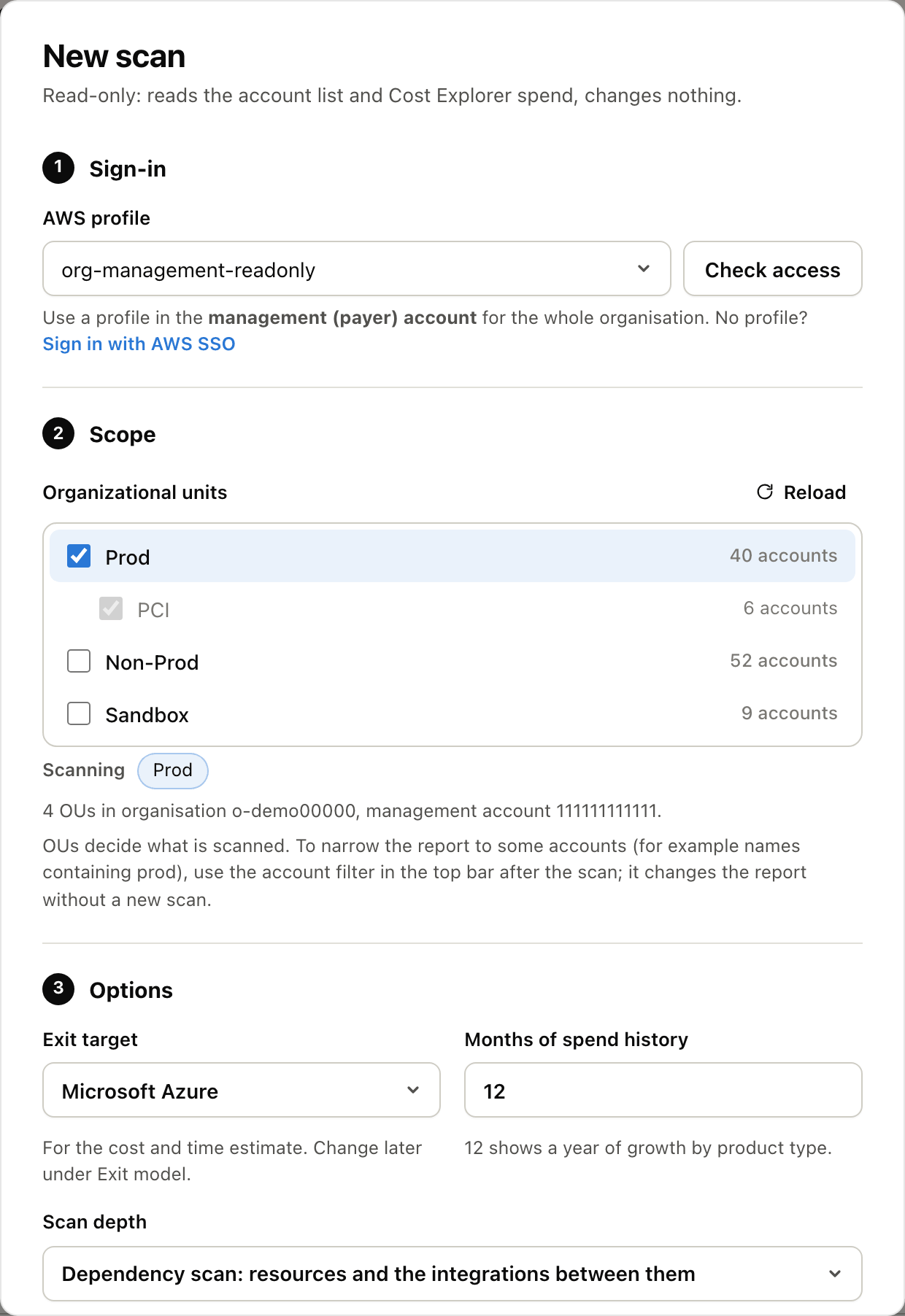
exitrisk serve starts the console on http://127.0.0.1:8740 and opens it in your browser. It listens on this computer only. The first screen has three steps:
- 1Connect to AWS. AWS sign-in for SSO or IAM Identity Center (paste your portal’s start URL once), or any AWS CLI profile already on the machine, including aws-cli-zsp. Use the management (payer) account to see every account.
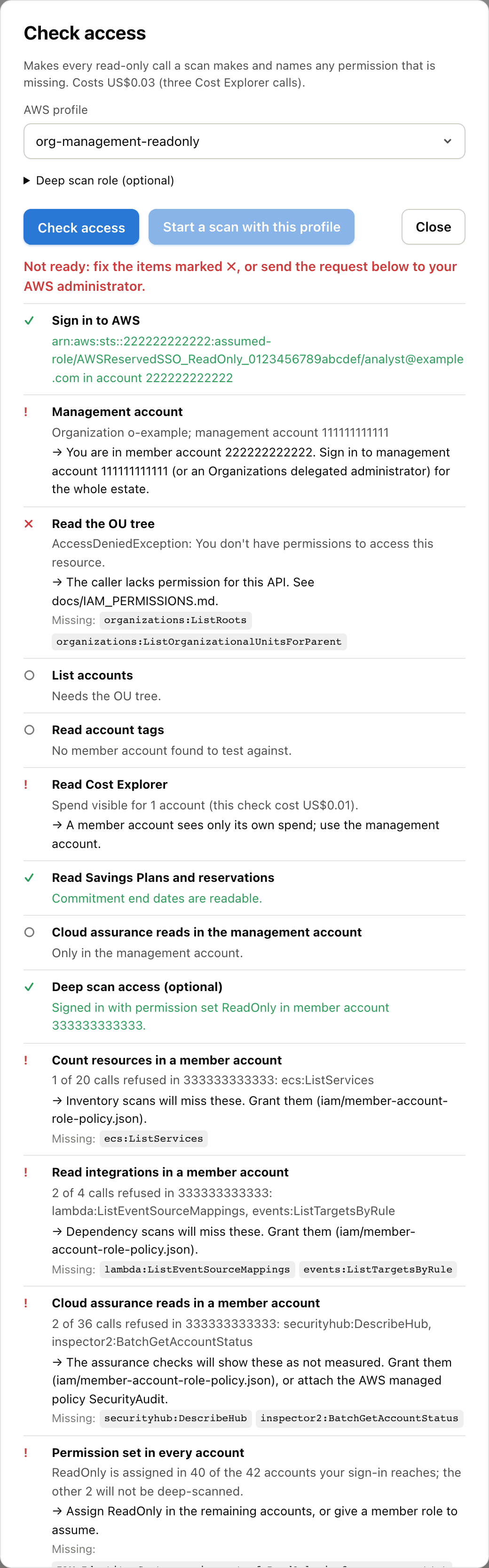
- 2Check access. Tests the read-only calls a scan needs and shows a tick or a cross with the fix for each. If anything is missing it writes the request to send your AWS administrator.
- 3Scan and report. Seconds for hundreds of accounts. Type prod in the filter bar, answer the questions under Exit model in the top bar, then Export PDF above the report.
No AWS access yet? Settings (the gear, top right), then Load demo data, shows a synthetic bank estate: 49 accounts and made-up numbers. Every screenshot on this page comes from it.
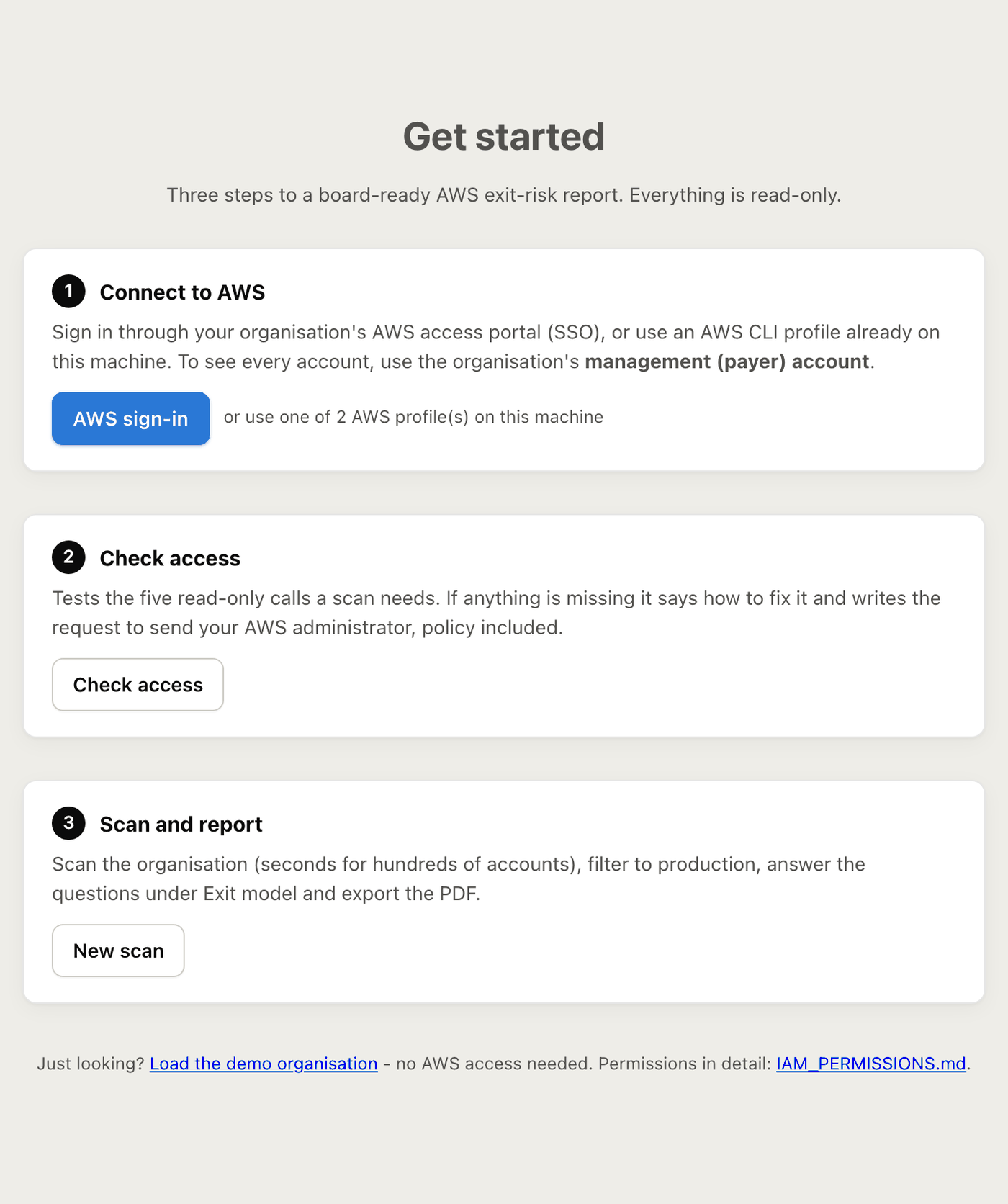
New scan
Sign-in
The AWS profile for the management (payer) account, or Sign in with AWS SSO. Check access sits beside it.
Scope
One or more Organizational Units. To narrow the report to some accounts (names containing prod, say), use the account filter after the scan: it changes the report without a new scan.
Options
The exit target (Azure by default; also Google Cloud, Oracle Cloud, a sovereign or local cloud, an on-premises platform or a physical data centre), months of spend history (12 shows a year of growth), and the scan depth.
Scan depth
Quick (spend only, seconds for hundreds of accounts), inventory (resource counts) or dependency (resources and the integrations between them). Only regions with spend makes a deep scan about twice as fast.
Extras
Tick Run the Cloud Assurance Framework checks, and Add an Agentic Risk Review to the report, if you want them.
A spend-only scan of a few hundred accounts takes seconds. A deep scan takes about 20 seconds per account with 18 regions enabled, 8 accounts at a time: about 15 minutes for 166 accounts.
To upgrade later, then restart the console once its running scans have finished:
uv tool upgrade aws-regulatory-risk-review-framework
exitrisk serve --replace
Read-only, and it says what is missing.
Everything is read-only. The core score needs only Organizations and Cost Explorer read access in the management (payer) account. Cost Explorer must be enabled there.
Spend-only scan (management account)
Organizations read (the OU tree, accounts and their tags) and Cost Explorer read (spend by account, service, month and region, plus Savings Plans and reservations). Enough for the full score, ranking, charts and estimate.
Deep scan (member accounts)
A read-only role, ExitRiskReadOnly, in each member account (one CloudFormation StackSet), or your own Identity Center permission set there. It counts resources and, for a dependency scan, the integrations between services. Only counts are stored: never names, ARNs or definitions.
Cloud Assurance checks
Extra list, describe and get calls through the same member role or permission set. Check access has two optional checks for them, one in the management account and one in a member account.
What your administrator grants. An IAM Identity Center permission set in the management account with the tool’s inline policy (least privilege), or the AWS-managed AWSOrganizationsReadOnlyAccess and AWSBillingReadOnlyAccess. Both come ready-made in Terraform and CloudFormation. Details: IAM_PERMISSIONS.md.
Check access
Makes every read-only call a scan makes, once, and names any permission that is missing: the OU tree, account names and tags, Cost Explorer spend, Savings Plans and reservations, and, for a deep scan, every inventory and dependency call inside one member account. Optional checks that fail show as warnings, and a quick scan still runs.
When something is refused it writes the request for your administrator: your identity, the management account id, the missing actions and the policy, ready to copy or download.
AWS sign-in (SSO), no terminal
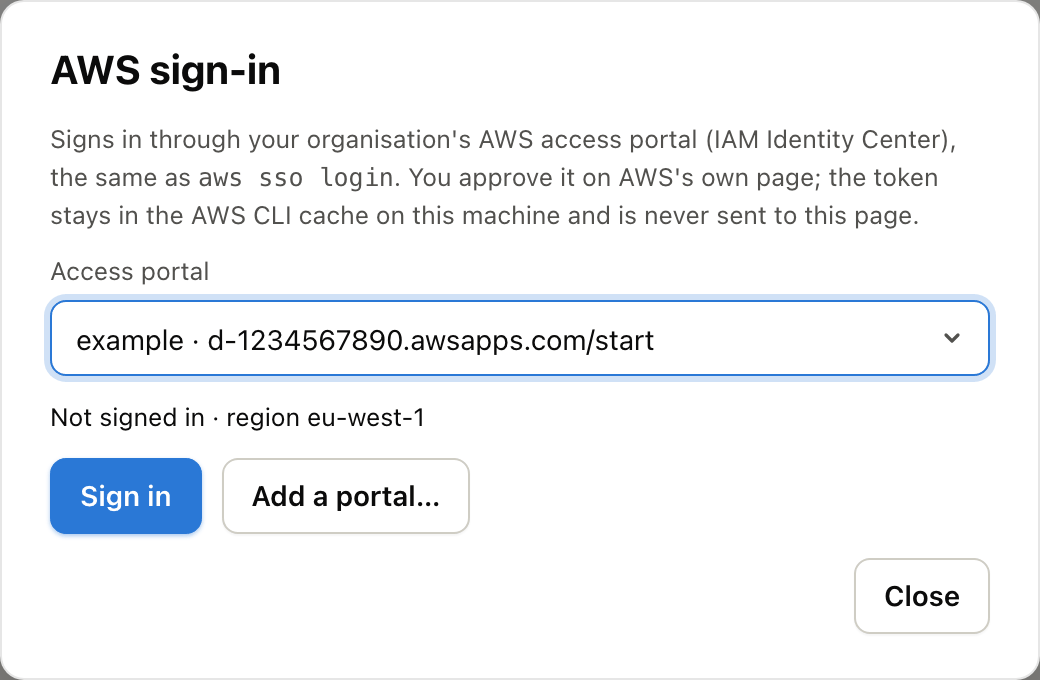
Click AWS sign-in in the header, add your access portal’s start URL once (its region is found automatically), and approve the sign-in on AWS’s own page. The console lists every account you can reach, preselects the management account, and Use for a new scan creates or reuses a matching SSO profile in ~/.aws/config. The token stays in the AWS CLI’s own cache and is never sent to the browser.
Profiles and aws-cli-zsp
The scanner uses standard profiles from ~/.aws/config, so anything boto3 supports works: SSO, credential_process, assumed roles. With AWS CLI ZSP the first API call of a scan asks for one Touch ID, and the one hour session covers the whole scan. The tool never reads, stores or logs keys.
Read in five minutes, defended for an hour.
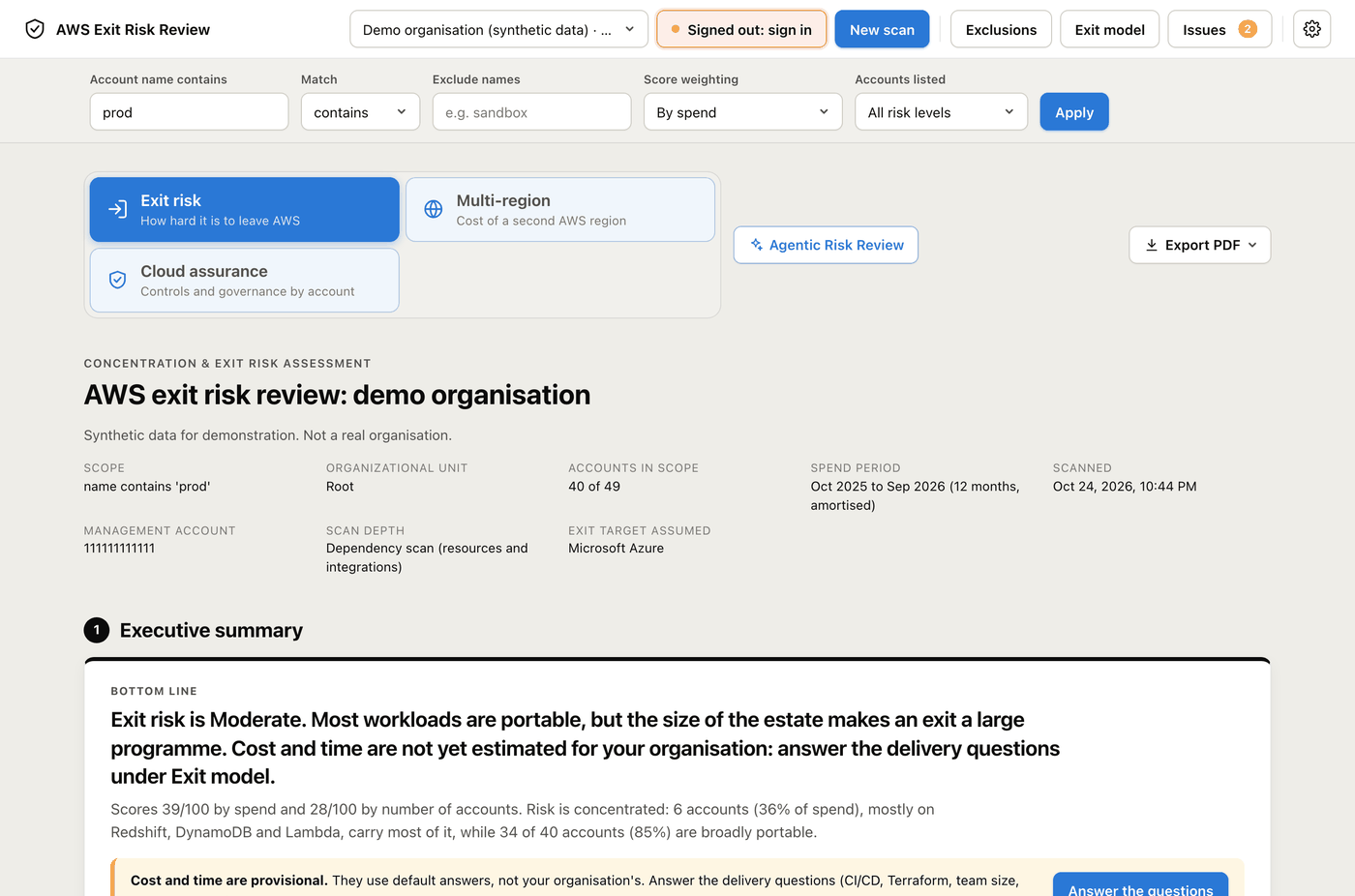
The report is one long page in nine numbered sections and an appendix. Filter it by account name in the bar at the top (contains, starts with, ends with or a regex, plus exclusions, such as prod, prd excluding sandbox). The report rebuilds at once, with no new scan. Click any screenshot to open it full size.
1. Executive summary
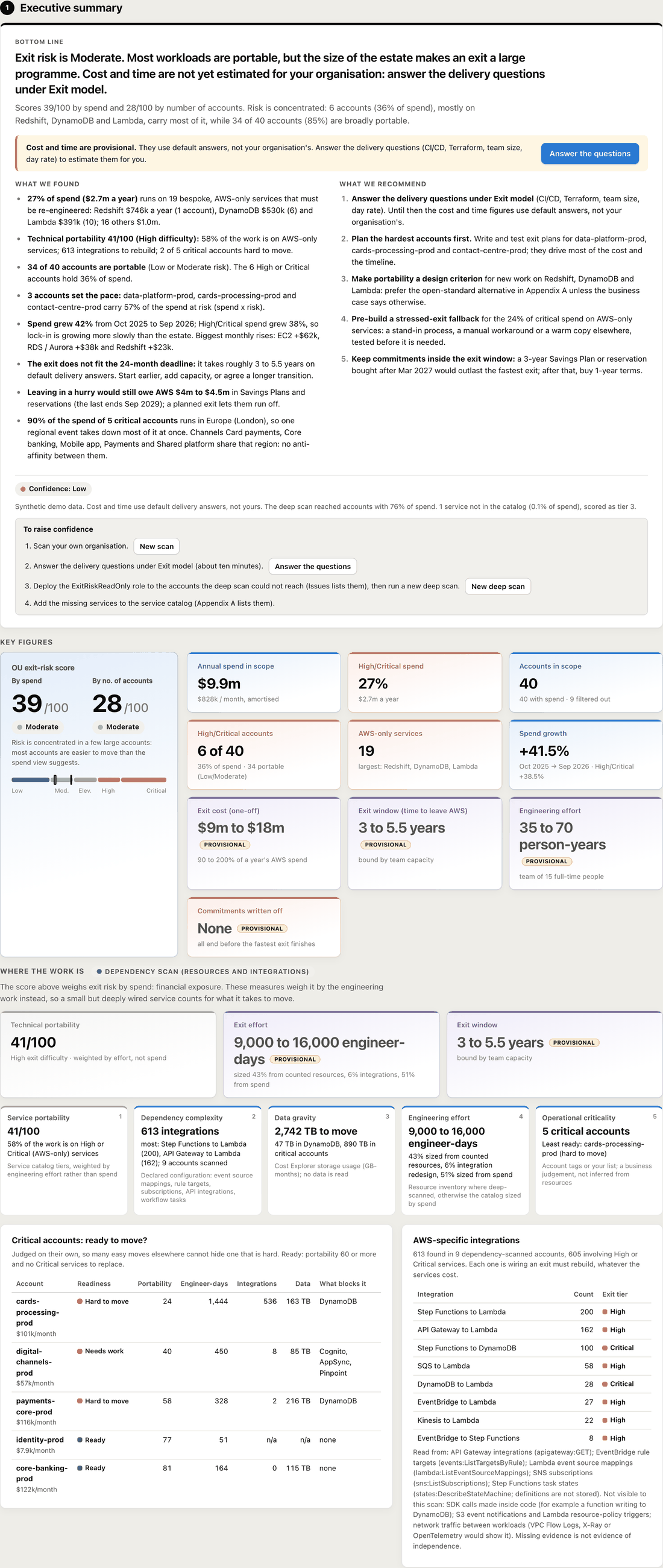
Bottom line, what we found, exit cost and time as ranges, recommendations and a confidence rating, then the key figures.
2. Agentic Risk Review
The optional AI second opinion, when you asked for one.
3. Risk profile
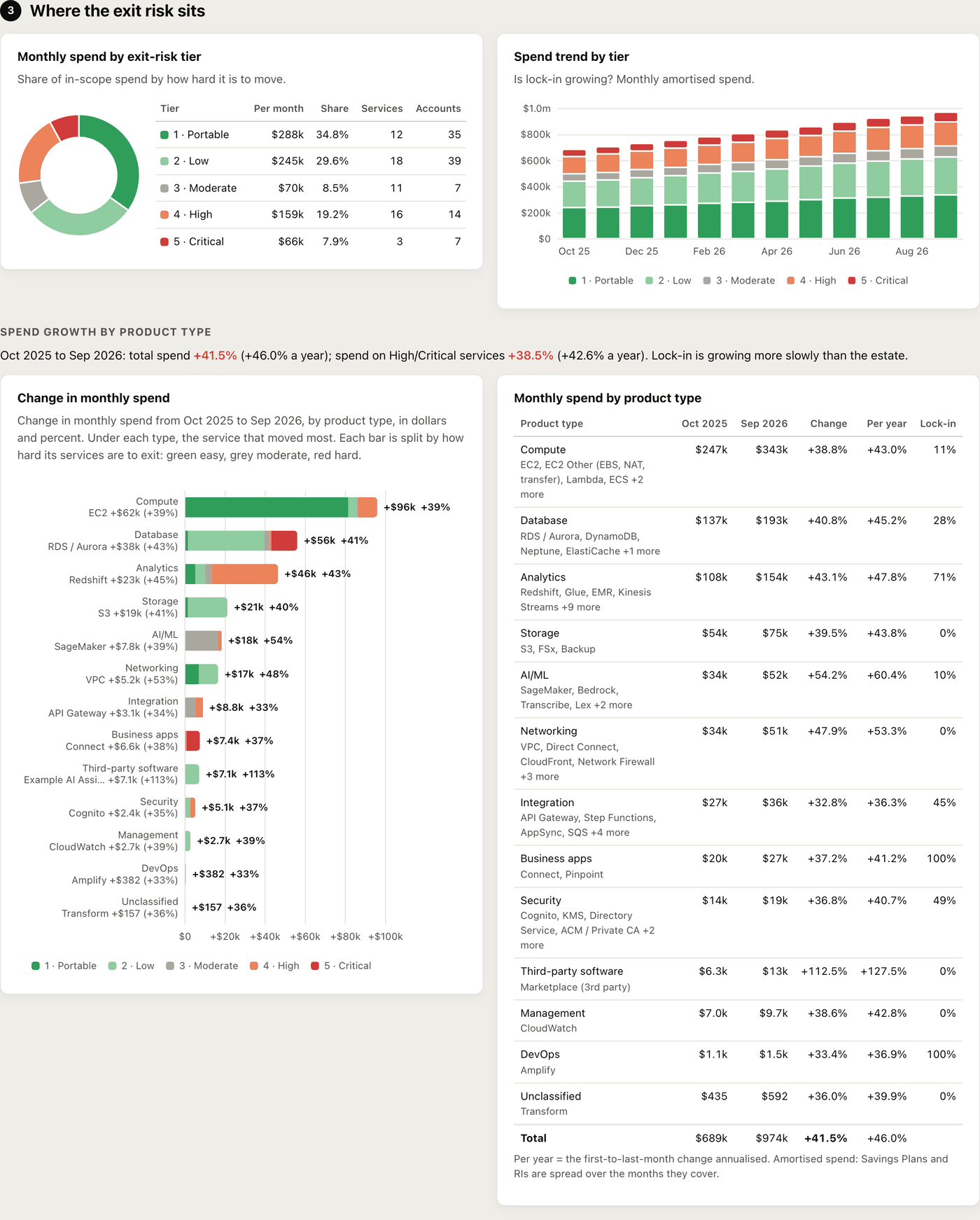
Spend by tier and its trend, and which product types are growing.
4. Accounts
How many are portable vs higher risk, risk vs spend, the ranking by spend at risk, and who owns the risk.
5. Services
The AWS-only services that drive lock-in, and third-party products billed through AWS.
6. Exit estimate and timing
Your answers, the exit timeline, where the effort goes, the notice period and commitments written off.
7. Resilience
Critical accounts, correlated failure by region and channel, a stressed exit, the data to move and the links to move it.
8. Areas of focus
The accounts that will decide the exit, why, how to tackle each and in which phase.
9. Data quality
What the report does not cover, and why. Every AWS API error is listed here with a fix.
Appendix
Each service’s tier, rationale, migration path, equivalents and typical duration.
1. Executive summary
A written brief you can read out as it is: the bottom line, what we found, what we recommend and a confidence rating that says why the numbers might move, with a step and a button for each way to raise it. Then the key figures: the two scores, annual spend, the share on High or Critical services, exit cost and window, engineering effort and commitments written off.
Two headline scores. By spend and by number of accounts. If the spend score is much higher, risk sits in a few big accounts; if the account score is higher, it is spread across many small ones.
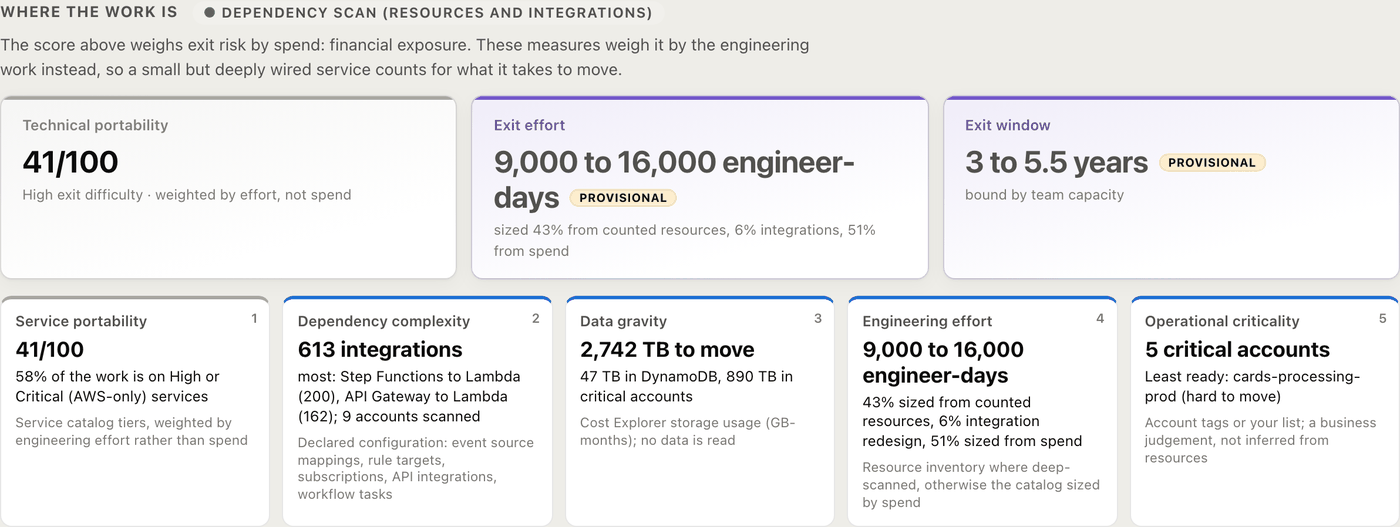
Where the work is. Spend measures exposure, not difficulty. Beside the score the report gives technical portability (weighted by engineering effort), exit effort in engineer-days, the exit window, five dimensions (service portability, dependency complexity, data gravity, engineering effort, operational criticality) and the readiness of each critical account.
3. Risk profile
Spend by exit-risk tier, its trend month by month (is lock-in growing?), and the change in spend by product type, each bar split by how hard its services are to exit.
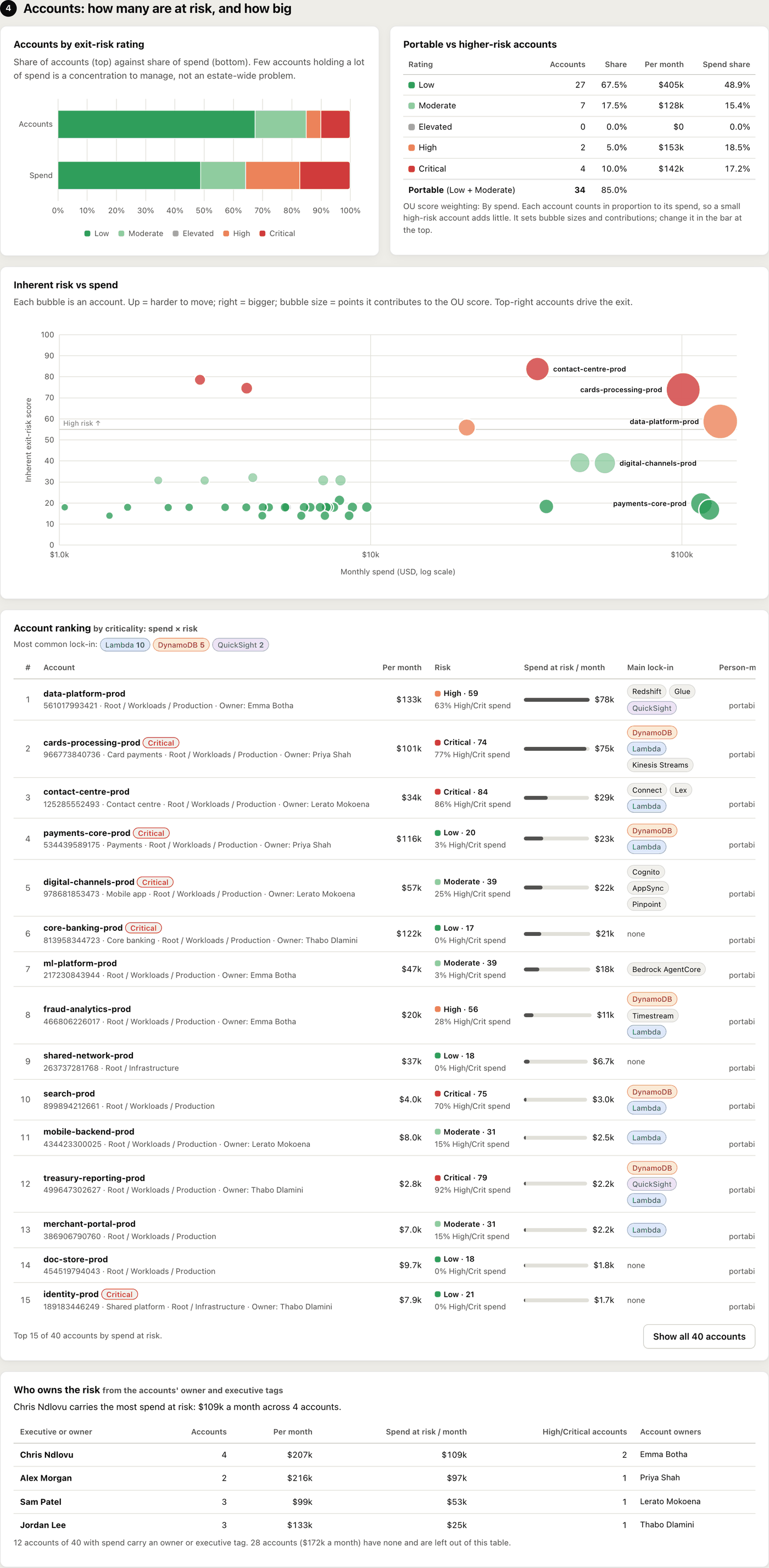
4. Accounts
How many accounts are portable against how many are higher risk, and the share of spend each group holds. A bubble chart of inherent risk against spend shows which accounts drive the exit (top right).
The account ranking sorts by spend at risk (monthly spend times risk), so large, hard-to-move accounts come first, with their main lock-in services. Who owns the risk totals spend at risk by executive and owner, from the accounts’ tags.
5. Services
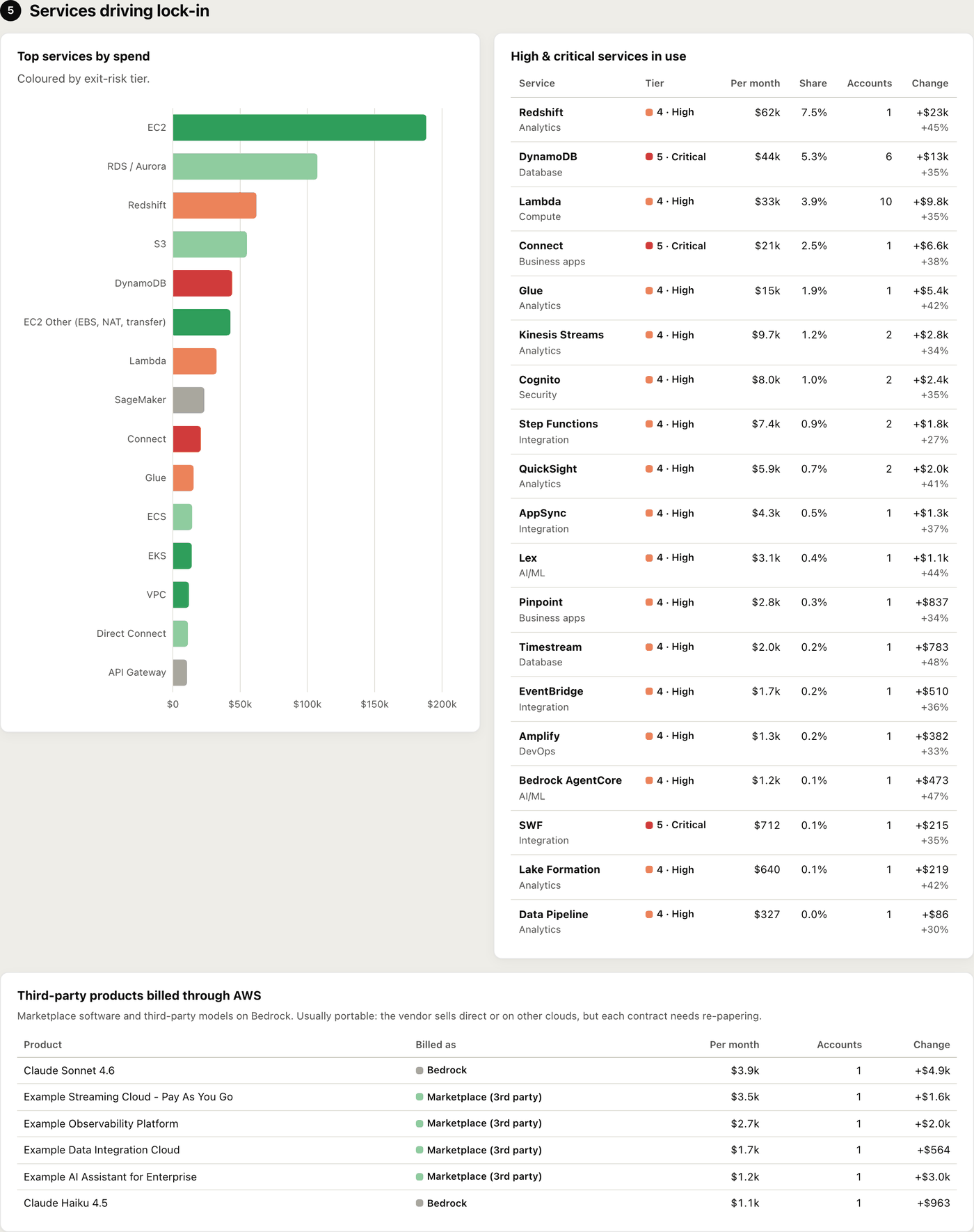
The top services by spend coloured by tier, the High and Critical services in use with their spend and growth, and third-party products billed through AWS (Marketplace software and third-party models on Bedrock), which usually move with a new contract.
6. Exit estimate and timing
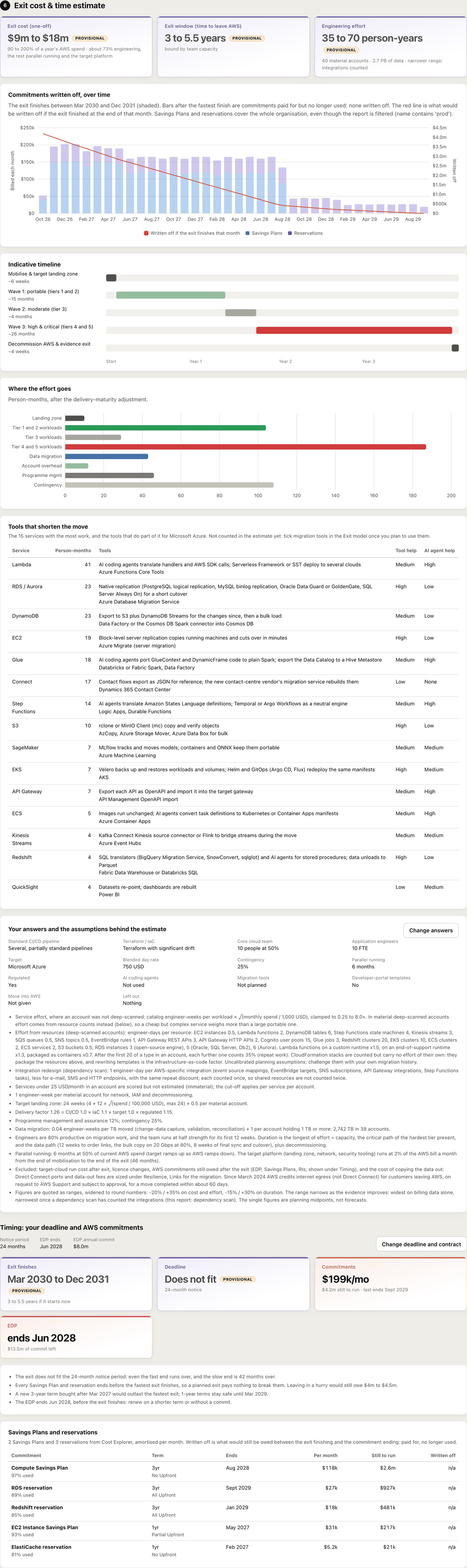
Exit cost, exit window and engineering effort as ranges, an indicative timeline by wave, where the effort goes, the tools that shorten the move for each service, and every answer and assumption behind the estimate.
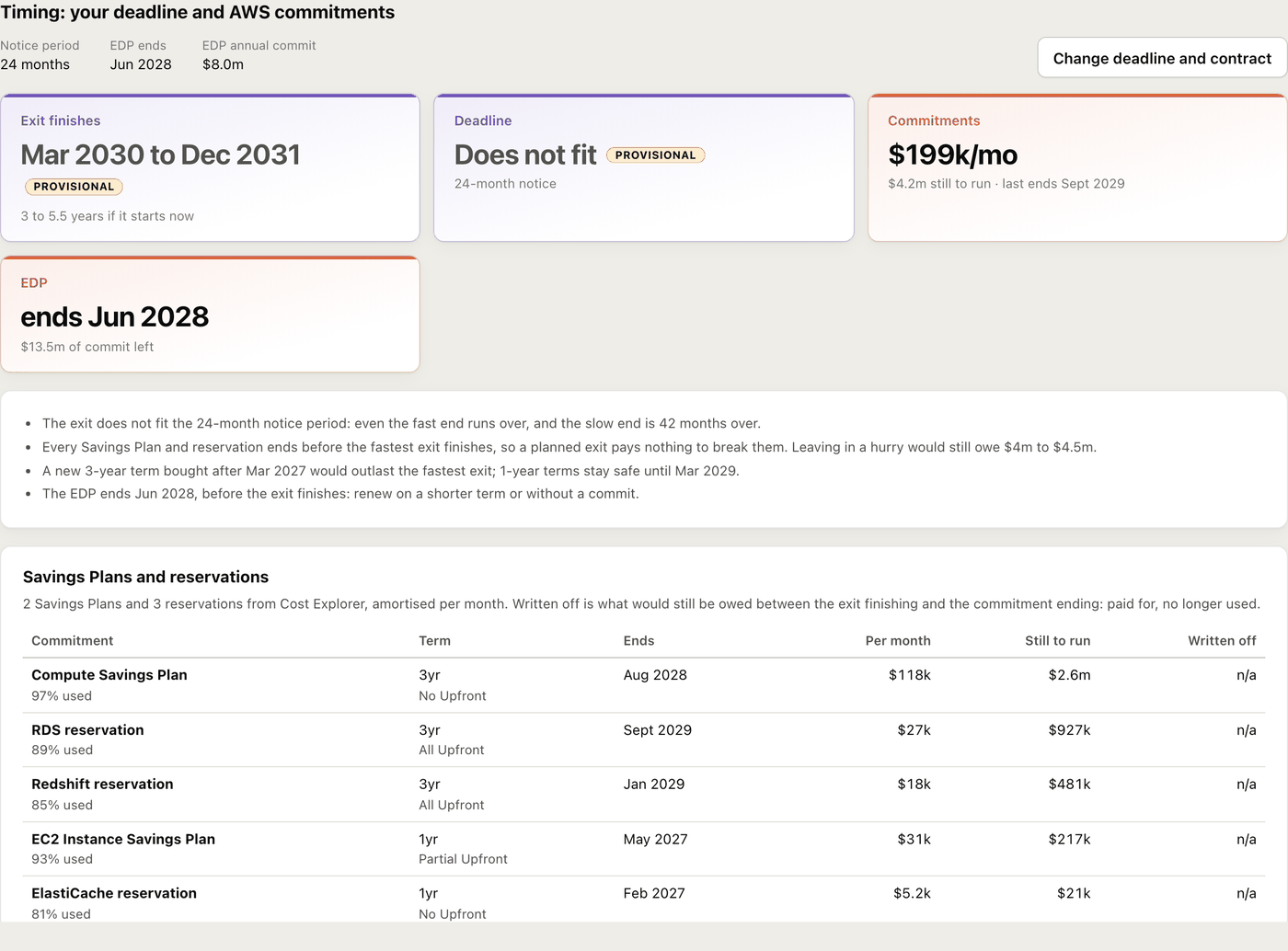
Timing checks whether the exit fits the notice period you enter under Exit model, which Savings Plans and reservations run off before it finishes, and what would be written off: still owed after the exit for capacity no longer used. A chart shows each month’s commitments with the exit window shaded, and the report gives the last date a 3-year term stays inside the window. Any EDP shortfall is counted too.
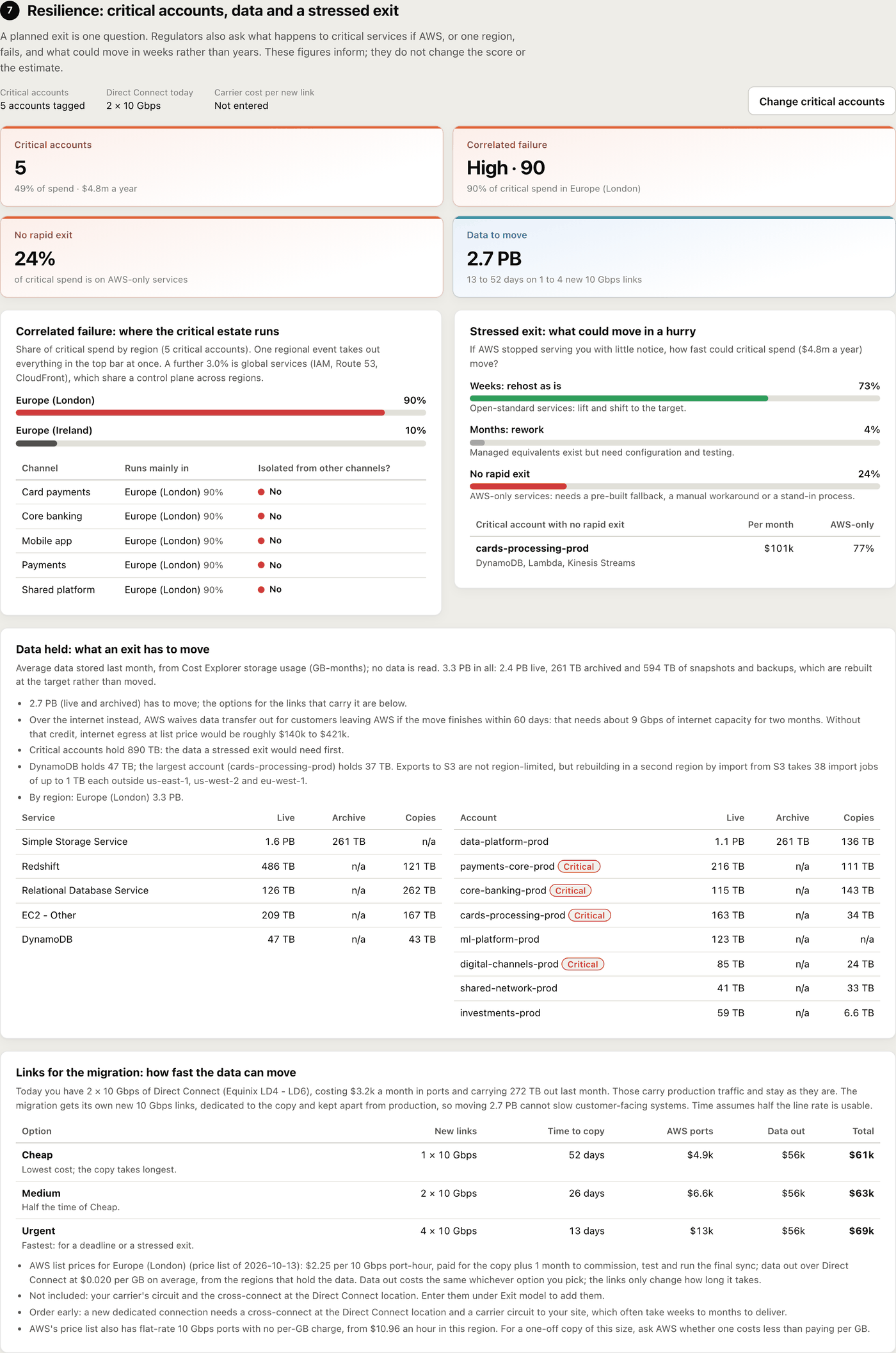
7. Resilience
Which accounts are critical (from tags such as Criticality = Tier1, or names you give), how much of the critical estate one regional event would take down, whether tier 1 channels are isolated from each other, what could move in weeks under a stressed exit, and how many terabytes an exit has to move. It counts the Direct Connect links you have today and prices three options for new 10 Gbps links dedicated to the migration, kept apart from production: Cheap (1 link), Medium (2) and Urgent (4), each with time to copy and cost at AWS list price.
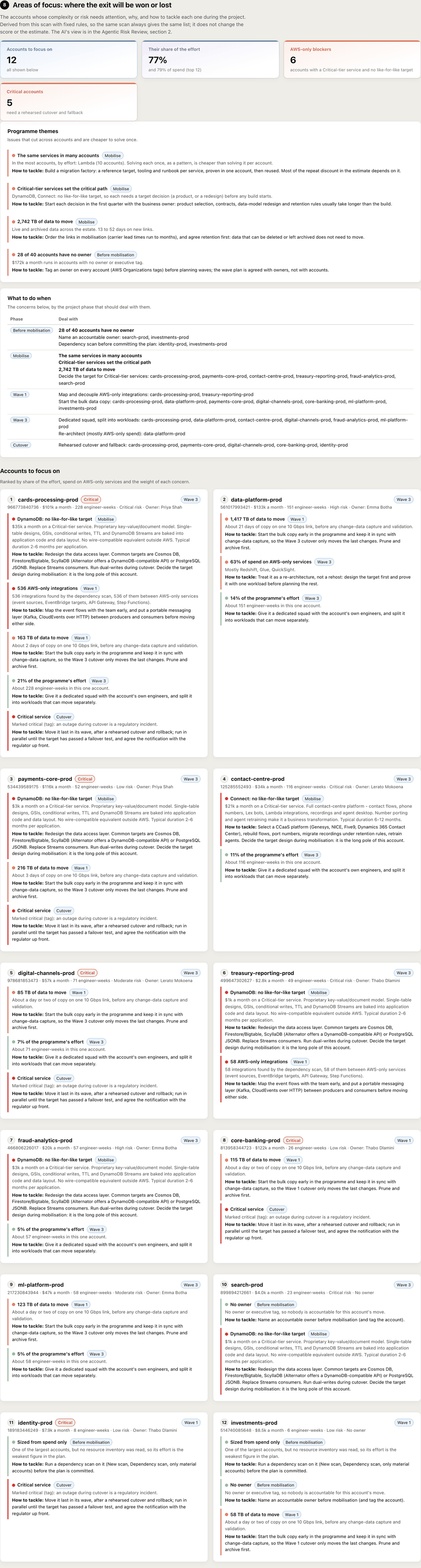
8. Areas of focus
The accounts whose complexity or risk will decide the exit: AWS-only services with no like-for-like target, critical services, AWS-only integrations, data to move, share of the effort, and evidence and owner gaps. Each says how to tackle it and in which phase, with programme themes and a plan by phase.
It comes from fixed rules, so the same scan always gives the same list. The optional Agentic Risk Review in section 2 gives the AI’s view beside it.
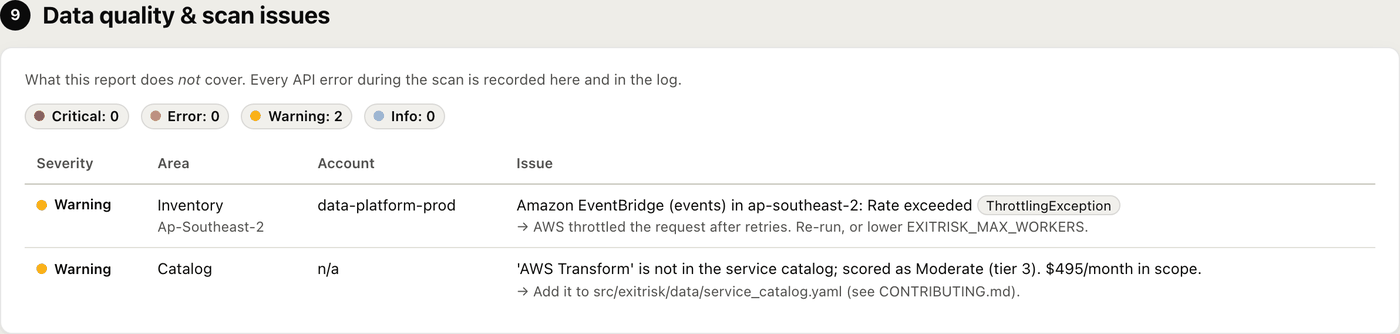
9. Data quality
What the report does not cover, and why. The report never fails silently: every AWS API error becomes an issue here with a fix, and is written to the log. Issues in the top bar shows the count, coloured by the worst severity, and jumps here.
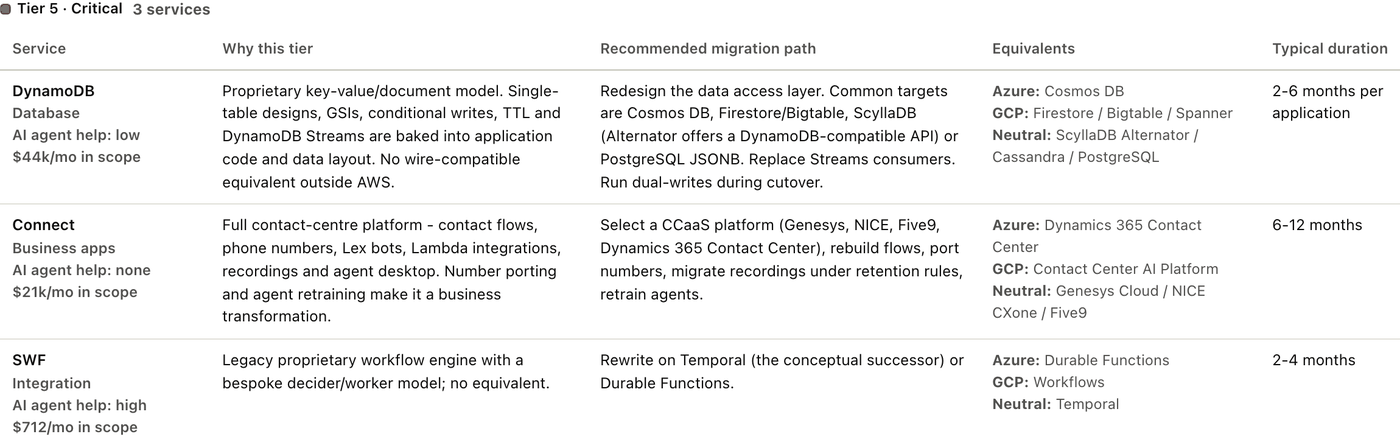
Appendix
Every service in scope with its tier, why, the recommended migration path, equivalents on Azure, Google Cloud and neutral platforms, and a typical duration. The catalog of 120 services is open and reviewable.
Make the estimate your own.
Until someone answers these, the estimate runs on defaults and describes a made-up organisation. The report marks cost, exit window and effort provisional and keeps them out of the bottom line. Open Exit model in the top bar; changing any answer, or pressing These answers are right, makes the figures your organisation’s own. The estimate updates in under a second, so you can change answers live in a meeting.
Standard CI/CD pipeline?
One standard, several partially standard, or mostly manual. One deployment pattern to retarget is cheaper than dozens.
Terraform used, and current?
Terraform current, Terraform with drift, CloudFormation or CDK, or little or none. Infrastructure as code that matches production lets the platform be recreated on the target.
Target platform
Azure, Google Cloud, Oracle Cloud, a sovereign or local cloud, an on-premises platform you already run, or a physical data centre (with where the hardware goes and whether you need a DR site).
Regulated entity
Yes adds exit-plan evidence, regulator notification and assurance testing to the effort.
Team and cost
Core cloud team size and % allocated, application engineers, blended day rate, currency, contingency, parallel-run months.
AI coding agents
Each service is rated for how much an agent cuts its porting work: Lambda about half, data moves not at all.
Notice period and critical accounts
The regulator or board notice period the exit has to fit (section 6), and the accounts that count as critical (section 7) when no criticality tag says so.
Exclusions in the top bar lists every AWS product in the scan with its spend. Tick any (Marketplace, say) and click Apply and regenerate to leave them out. No rescan is needed. Every formula is in METHODOLOGY.md.
What would a second region take?
The Multi-region tab answers the question a regulator asks once the exit plan is in place: what would it take to survive the loss of a whole AWS region? It uses the same scan, so there is nothing new to collect and no new permission. For the accounts you choose it gives:
- the extra cost to run a year: infrastructure, replication traffic, the AWS Support uplift and extra people;
- the cost and time to achieve it, and the extra staff;
- a recommended second region, from service parity, latency and price;
- failover risks per account and service: fails over by itself, needs manual or scripted failover (EC2, most databases), must be restored or re-run (Redshift, Glue, EMR), or is not offered in that region.
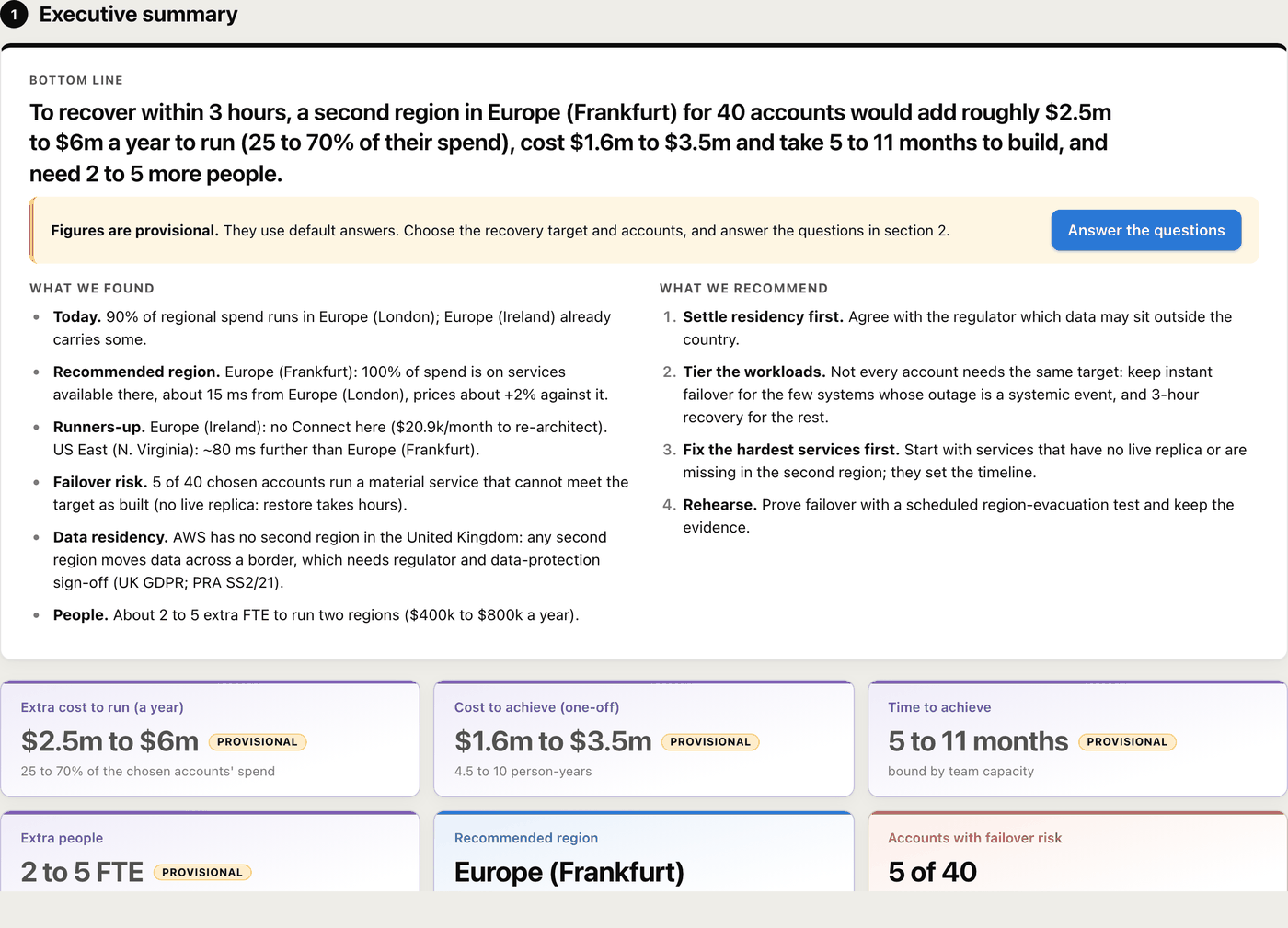
Choices (section 2). The recovery target (recover within 3 hours, or instant failover), where the second region may be (anywhere, same continent, jurisdiction or country), the primary and second region, and the AWS Support plan. Team, day rate, CI/CD and Terraform are shared with the exit estimate. Every figure is a range and stays provisional until these are confirmed.
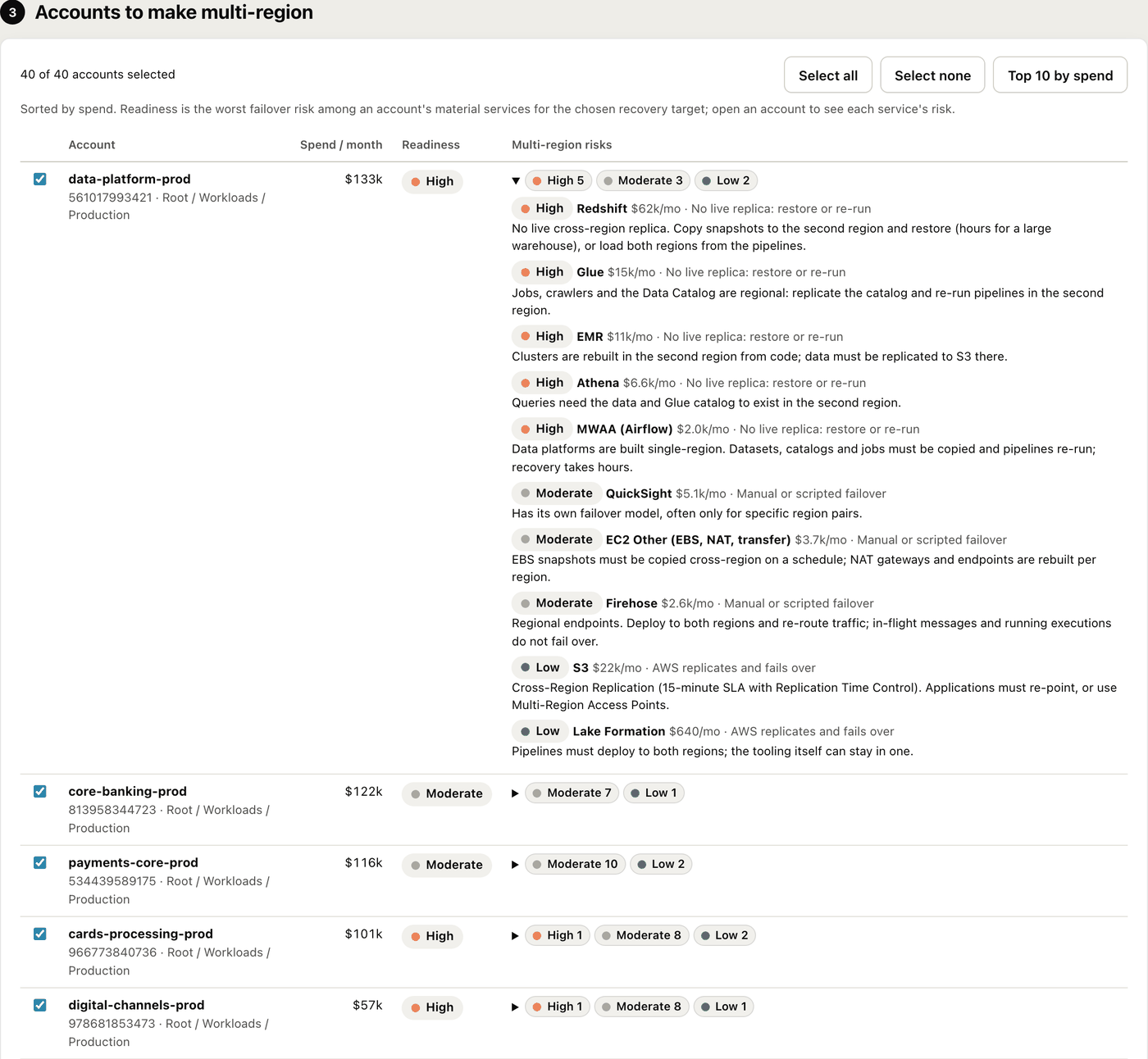
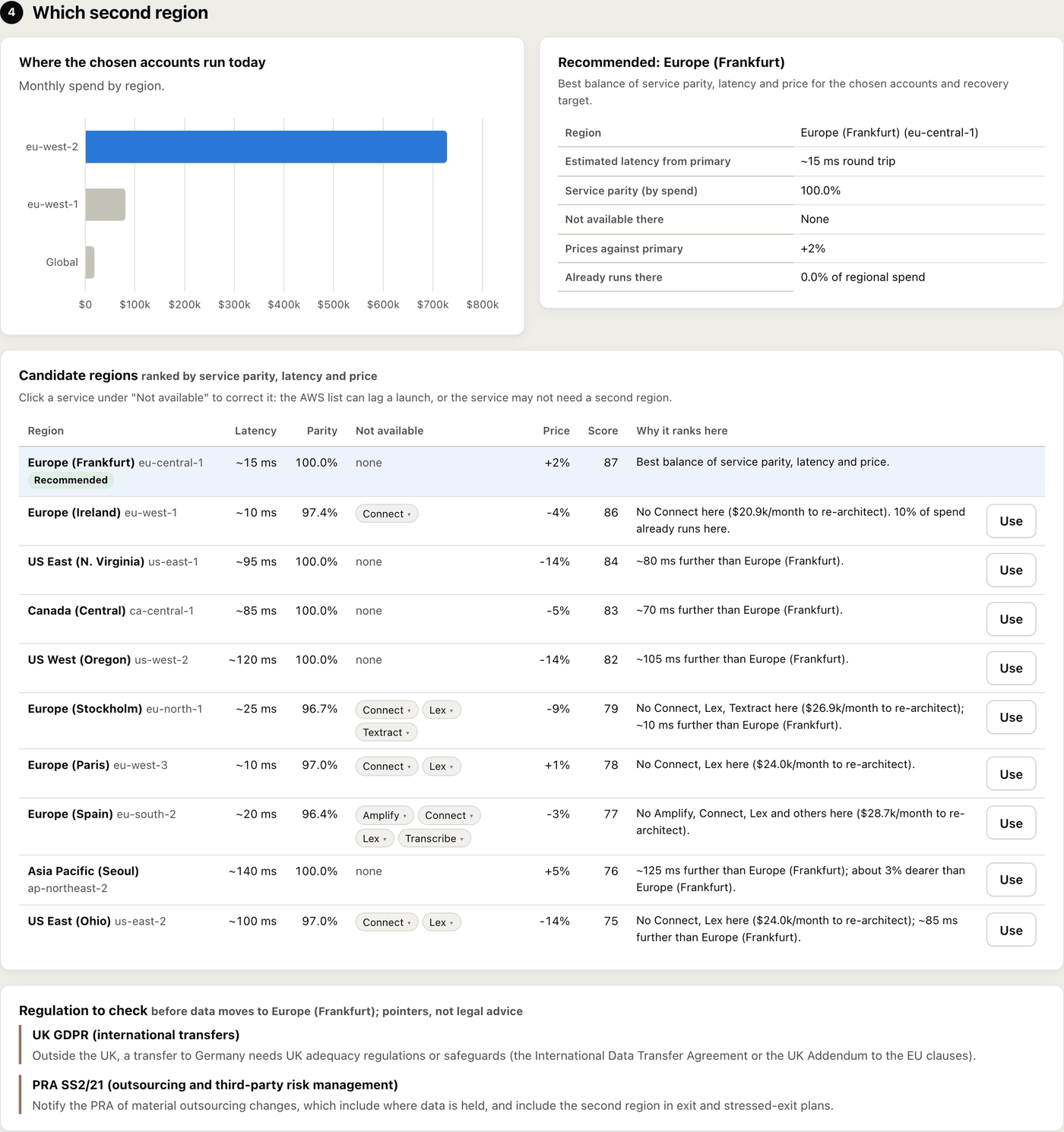
Click a service under “Not available” to correct it: available in that region (the AWS list lags launches), or not needed in the second region at all. The regulation list (POPIA and the Prudential Authority, GDPR and DORA, UK GDPR and PRA SS2/21) is a pointer for the compliance conversation, not legal advice. Details: MULTI_REGION.md.
The controls a regulator asks about.
A separate report from the same console and scan. It scores every account against 139 controls in 13 areas: who holds administrator access, what is reachable from the internet, whether changes are logged and made through pipelines, whether production survives the loss of a data centre or region, whether sensitive data is protected against silent change, and who owns each account.
- 1Check access tests the extra read permissions (two optional checks, in the management account and in a member account).
- 2New scan, tick Run the Cloud Assurance Framework checks. It works with any scan depth and uses the same member role or permission set. From the command line:
exitrisk scan --profile mgmt --assurance --spend-regions
- 3Open the Cloud assurance tab, choose the ruleset and the settings in section 2, and export the PDF from Export PDF.
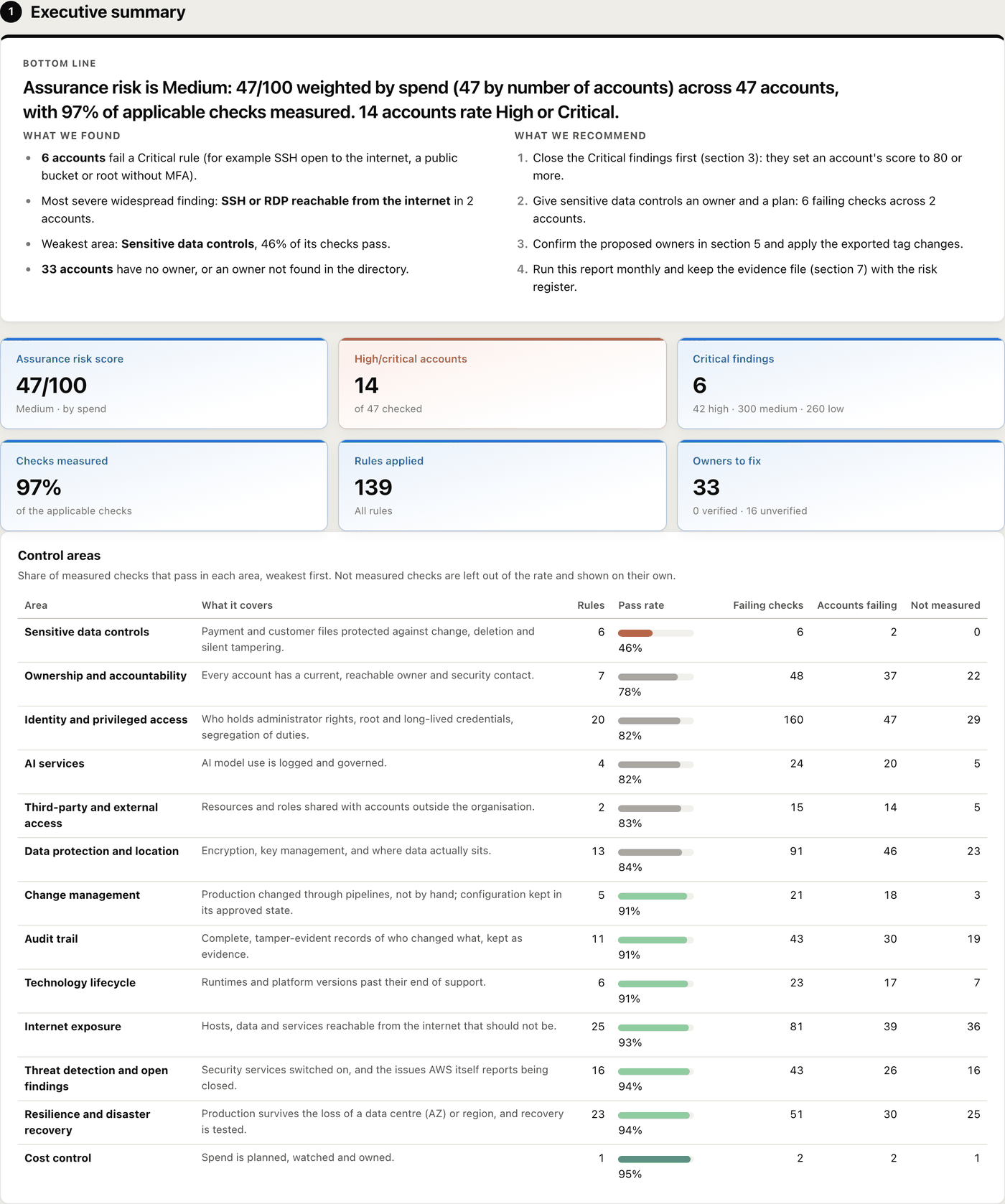
The 13 areas
Internet exposure (25)
Hosts, data and services reachable from the internet that should not be.
Identity and privileged access (20)
Who holds administrator rights, root and long-lived credentials, segregation of duties.
Audit trail (11)
Complete, tamper-evident records of who changed what, kept as evidence.
Threat detection and open findings (16)
Security services switched on, and the issues AWS itself reports being closed.
Data protection and location (13)
Encryption, key management, and where data actually sits.
Sensitive data controls (6)
Payment and customer files protected against change, deletion and silent tampering.
Change management (5)
Production changed through pipelines, not by hand.
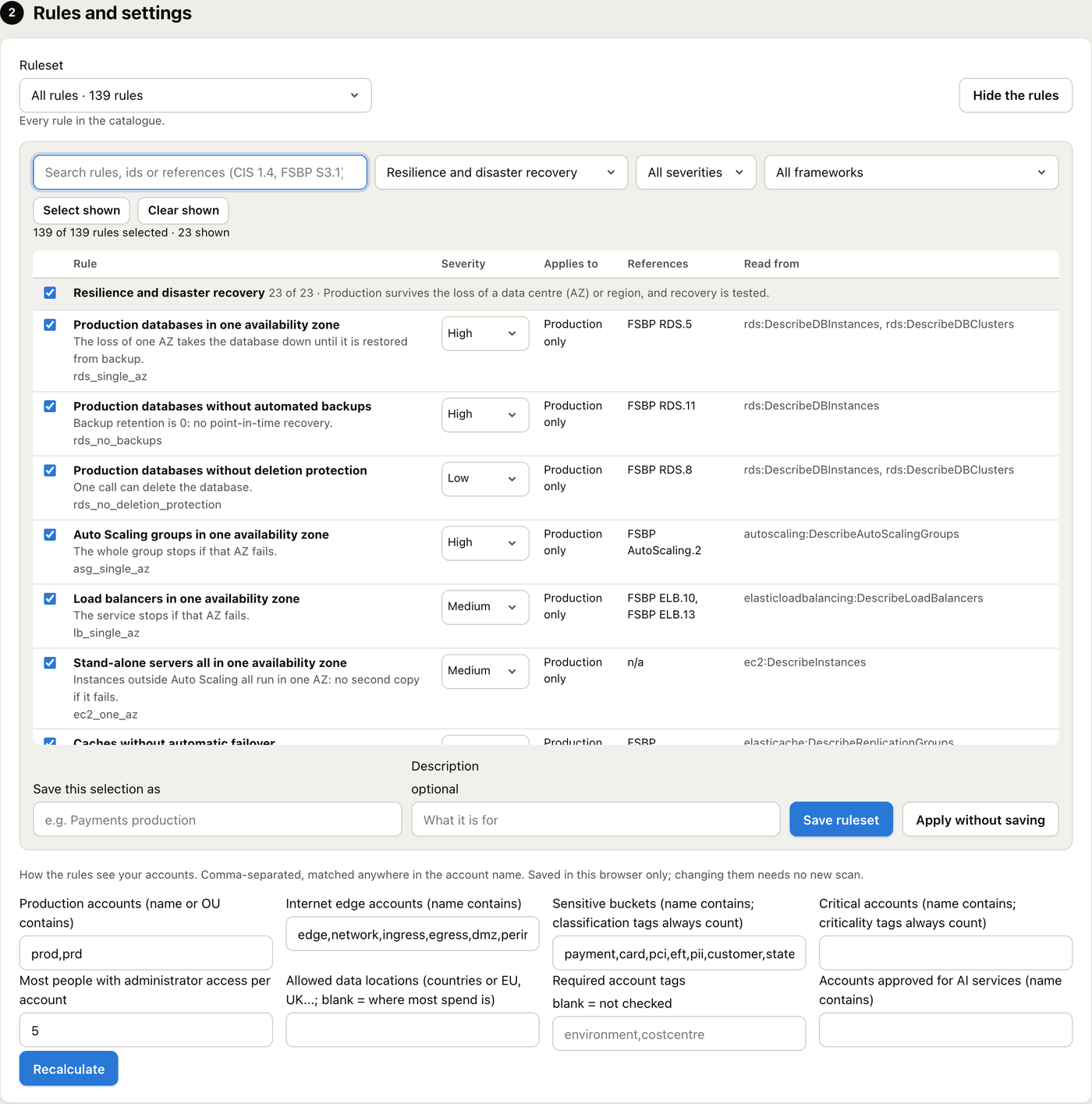
Resilience and disaster recovery (23)
Production survives the loss of a data centre or region, and recovery is tested.
Technology lifecycle (6)
Runtimes and platform versions past their end of support.
Third-party and external access (2)
Resources and roles shared with accounts outside the organisation.
Ownership and accountability (7)
Every account has a current, reachable owner and security contact.
Cost control (1)
Spend is planned, watched and owned.
AI services (4)
AI model use is logged and governed.
Rules and rulesets
Choose rules in section 2 shows every rule, searchable by name, id or reference (CIS AWS Foundations Benchmark v3.0, AWS Foundational Security Best Practices) and filterable by area, severity and framework. Tick the rules that apply, change a severity if your policy rates it differently, then Apply without saving or Save ruleset under a name such as “Payments production”.
Built-in rulesets: All rules, Regulator essentials (critical and high), CIS AWS Foundations, AWS Foundational Security Best Practices, Resilience and disaster recovery, Sensitive data, and Identity and access. Changing the ruleset or any setting rebuilds the report at once, with no new scan.
Settings say how the rules see your accounts: which are production, which are the internet edge, which buckets are sensitive, which accounts are critical, how many administrators are acceptable, where data may be held, which tags are required and which accounts may use AI services.
Findings and accounts
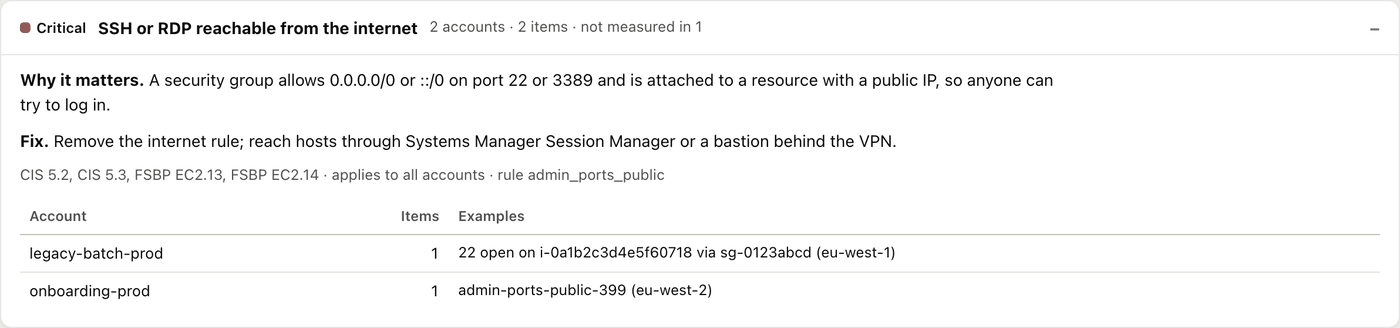
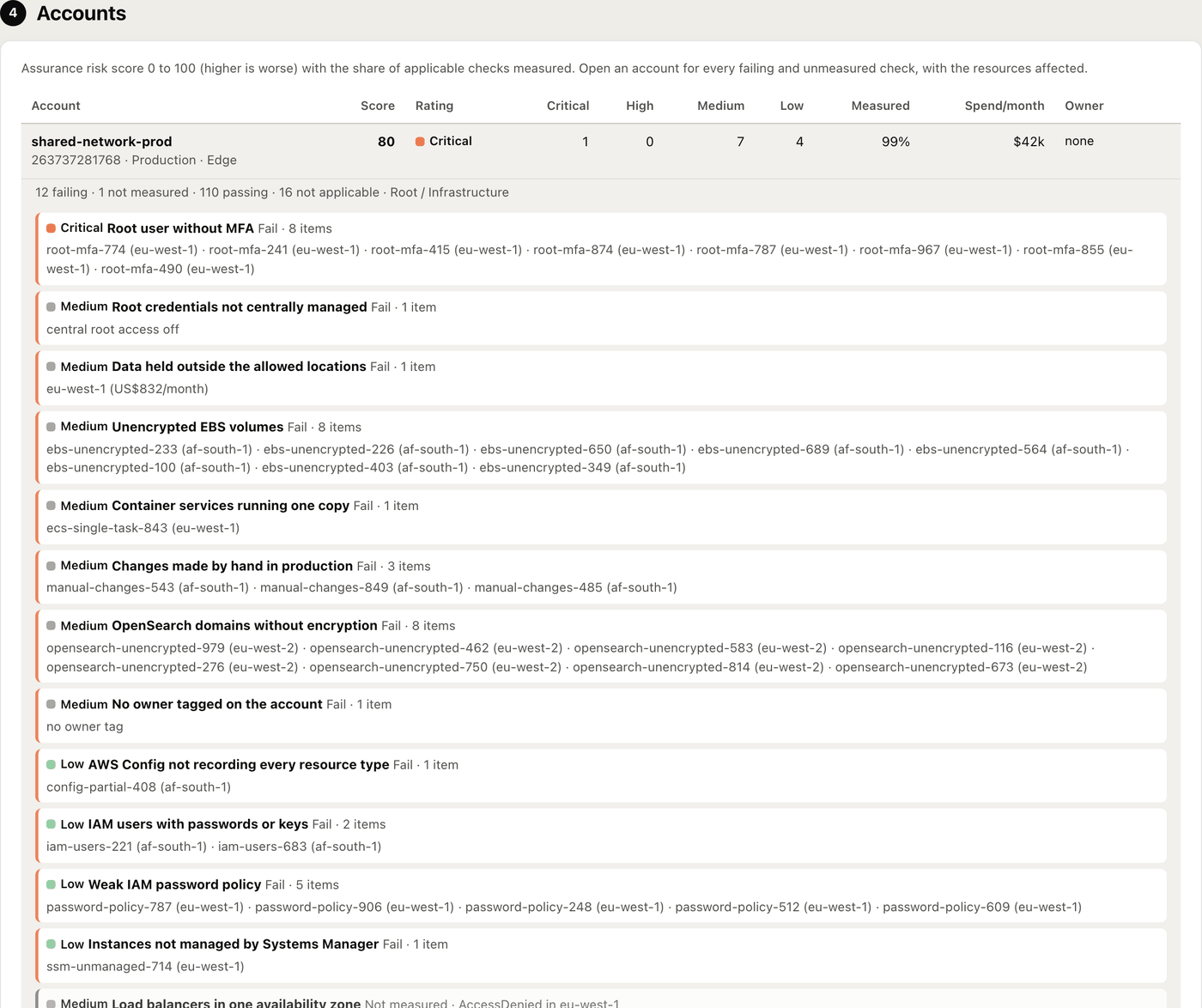
Each finding says why it matters, how to fix it and where. Each account opens to its failing and unmeasured checks, with the resources affected.
Scoring
- Each check is Pass, Fail, Not measured or Not applicable. A refused or failed call is Not measured, never a pass, and coverage is shown beside every score.
- Each failing rule adds its severity’s points once: Critical 40, High 15, Medium 5, Low 1. Points combine with diminishing returns, so the score stays between 0 and 100.
- A critical account counts its points 1.5 times. Any failing Critical rule sets the score to at least 80.
- Ratings: Critical 80 and above, High 50 to 79, Medium 20 to 49, Low below 20. The OU score is weighted by spend, with the plain average beside it.
Ownership and evidence
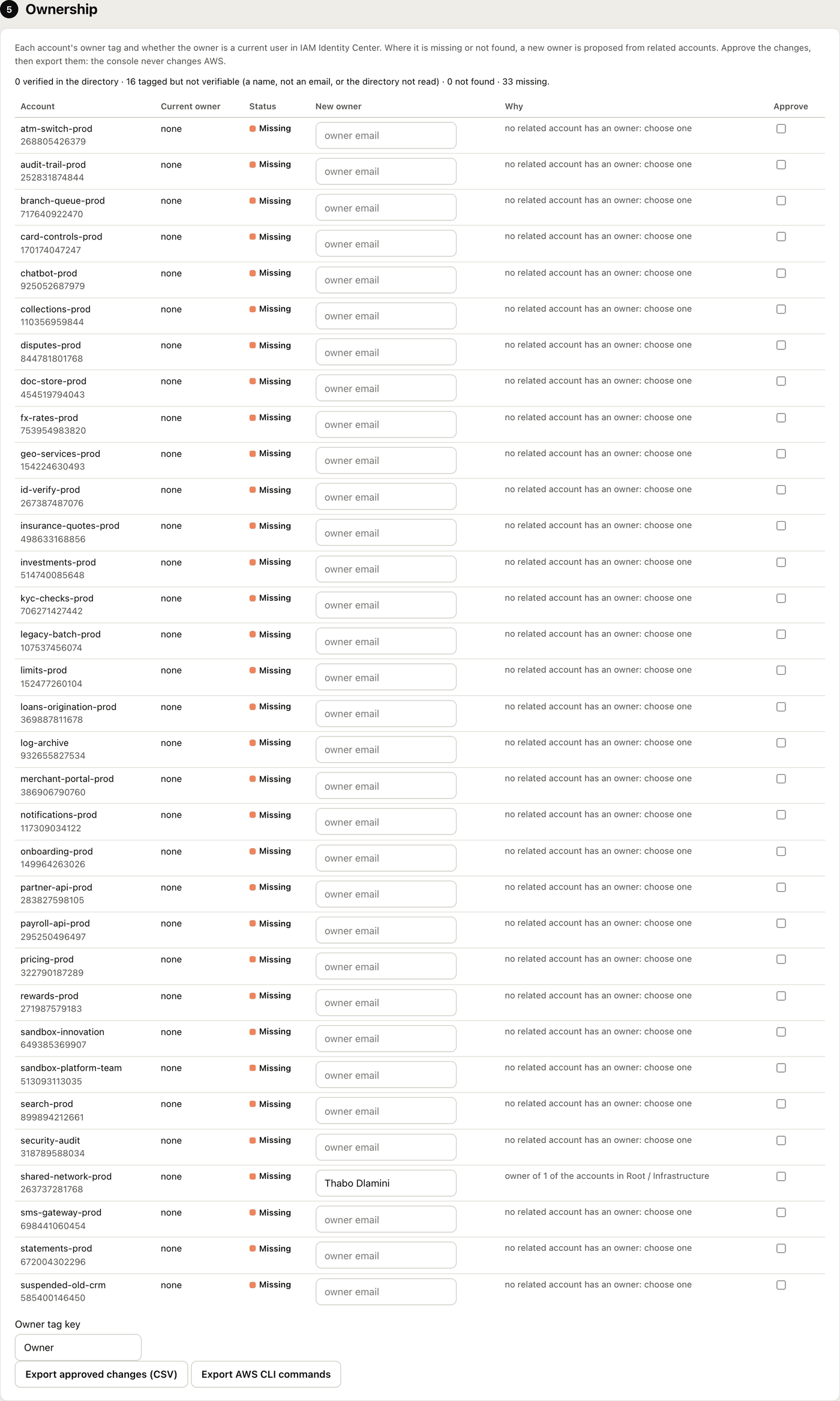
Section 5 lists accounts with no owner tag, or an owner email not found in IAM Identity Center. For each it proposes the owner most related accounts have (for example payments-dev from payments-prod), or the most common owner in its OU. Edit the proposal, tick Approve, and export the approved changes as a CSV or as AWS CLI commands for an administrator to review and run. The console never changes AWS.
Download evidence (section 7) saves the report as JSON with a SHA-256 of its canonical form. Keep it with the risk register: recomputing the hash shows the file is unchanged. Each report names the catalogue version and the scan id. Every rule is listed in CLOUD_ASSURANCE.md.
An optional second opinion.
The report’s figures come from a deterministic model: the same scan always gives the same score, estimate and areas of focus. The Agentic Risk Review adds a second opinion from a large reasoning model on how entrenched the estate is, what the exit will cost and take, and where to focus. It is off until you ask for it, and it never changes the report’s own figures.
- 1Once: Settings, AI configuration to choose the provider, model and key. Test connection proves it works in seconds.
- 2New scan, tick Add an Agentic Risk Review to the report. It needs a deep scan, so ticking it switches the scan depth to a dependency scan.
- 3Read the report while it runs. The result lands in section 2, right after the executive summary, and is included in the PDF. For an older scan, section 2 has a Run Agentic Risk Review button.
It works in three passes: an analysis of each account, a view of the whole estate, then an independent review that checks the draft for inconsistencies and corrects it. Section 2 opens with the overall AI summary, then the accounts to focus on, what will decide the exit, programme risks, sequencing, quick wins and questions for owners. A demo estate of 48 accounts takes about 6 minutes; a large estate 20 to 40 minutes. The result shows its approximate cost.
Amazon Bedrock
An AWS profile or a Bedrock API key. The summary stays in your AWS account.
Claude Enterprise or Claude API
An API key from your organisation’s Claude Console.
Together AI
GLM, with a Together API key.
OpenRouter
Claude or GLM models, with an OpenRouter API key.
AI gateway (Portkey, LiteLLM or your own)
Any OpenAI-compatible endpoint, so the guardrails, logging and billing you already have still apply.
What is sent: a summary of the report as filtered (per account its name, OU path, spend, services and tiers, effort, data size, integration counts, critical flag and owner tag, plus the estate totals and estimate). Never resource names, ARNs, configuration or AWS credentials. Hide account names and owners, on by default for third-party providers, swaps them for codes and restores them in the answer. Check the provider is approved for this data first. Details: AI_REVIEW.md.
A fixed version for the minutes.
Export PDF above the report gives a board-ready PDF with charts, an executive narrative, a data-quality section, and an appendix explaining every service’s tier, migration path and typical duration. The footer carries the scan id, catalog version and generation time, so the minutes reference a fixed version.
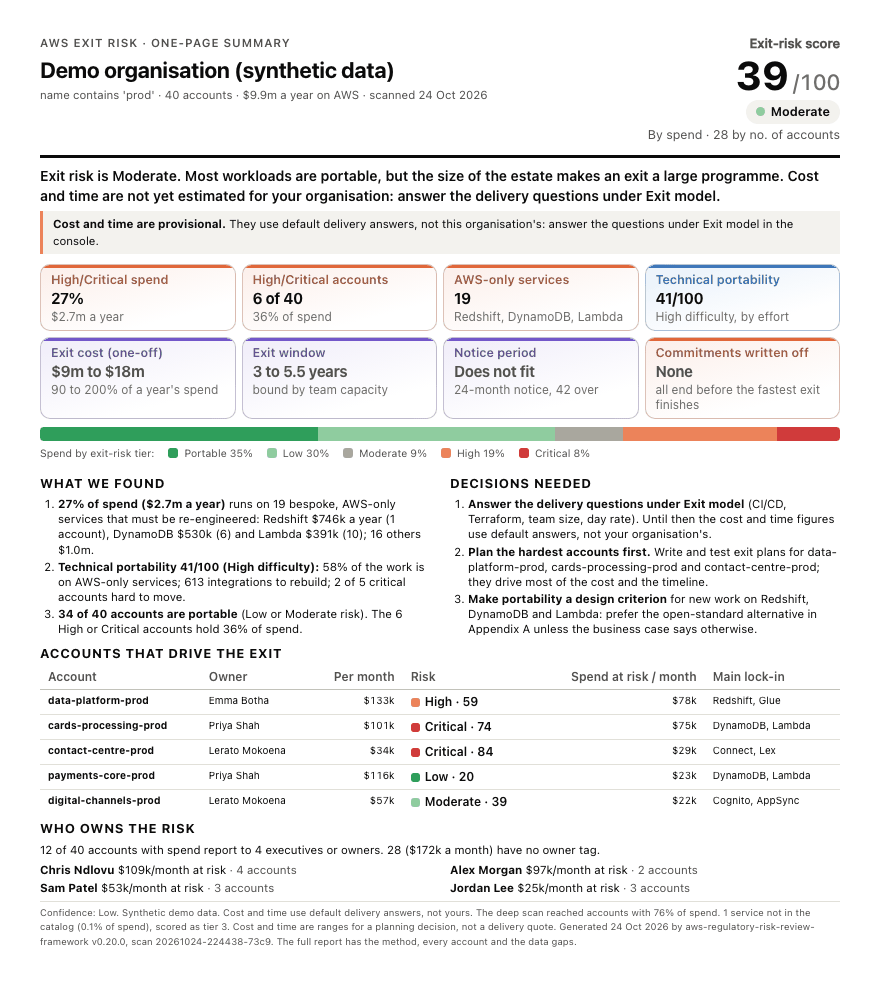
Export PDF, One-page summary prints an ExCo summary on a single A4 page: the score, headline, key tiles, tier bar, top findings and decisions, the accounts that drive the exit with their owners, and who owns the risk. Use it for a board pack cover or a pre-read; the full report stays the reference.
The Multi-region and Cloud assurance views export the same way. Sample PDFs from the demo data: exit risk, one-page summary and multi-region.
From the command line (PDFs need the pdf extra and Playwright’s Chromium):
exitrisk pdf <scan-id> --include prod --questionnaire answers.json --out board-pack.pdf
exitrisk pdf <scan-id> --include prod --onepage
exitrisk pdf <scan-id> --view assurance --include prod
exitrisk report <scan-id> --include prod --questionnaire answers.json
Compare scans (Settings) shows what changed between two scans: score, spend, tiers, accounts added, removed or re-rated, and services that grew or appeared. A monthly scan (Settings) repeats a scan each month so the comparison shows a trend.
Scans and PDFs without the browser.
Everything the console does can be scripted. mgmt is an AWS profile for the management account. Scans and logs live in ~/.exitrisk (or $EXITRISK_DATA_DIR).
exitrisk serve [--port 8750] [--replace]
Start the web console on 127.0.0.1. --replace restarts a running console once its scans finish.
exitrisk scan --profile mgmt --ou ou-ab12-cdef3456 --months 3
Spend-only scan. --ou a,b scans several OUs.
exitrisk scan --profile mgmt --inventory --role ExitRiskReadOnly
Plus resource counts in each member account.
exitrisk scan --profile mgmt --dependencies --role ExitRiskReadOnly
Plus the integrations between services.
exitrisk scan ... --inventory-scope material
Deep-scan material accounts only.
exitrisk scan ... --spend-regions
Only regions with spend: about twice as fast.
exitrisk scan --profile mgmt --assurance --spend-regions
Plus the Cloud Assurance Framework checks.
exitrisk scan --profile mgmt --target gcp
Exit target: azure (default), gcp, oci, sovereign, onprem, datacenter.
exitrisk pdf <scan-id> --include prod --questionnaire answers.json --out board-pack.pdf
Board PDF without a browser.
exitrisk pdf <scan-id> --include prod --onepage
One-page ExCo summary.
exitrisk pdf <scan-id> --view assurance --include prod
Cloud Assurance Framework Report as PDF.
exitrisk pdf --scan <id> --view multiregion --multiregion answers.json
Multi-region view as PDF (report gives the same as JSON).
exitrisk report <scan-id> --include prod --questionnaire answers.json
The report as JSON for other tools.
exitrisk catalog
List the service tiers.
Five tiers, weighted by spend.
Every service is placed in one of five tiers by how hard it is to move. The open catalog of 120 services says why for each one.
Tier 1 · Portable · score 10
EC2, EKS, EFS, ElastiCache, MSK, OpenSearch, Route 53
Tier 2 · Low · score 30
S3, RDS/Aurora, ECS, DocumentDB, KMS, CloudFront
Tier 3 · Moderate · score 50
SQS, SNS, API Gateway, Athena, SageMaker, Bedrock
Tier 4 · High · score 75
Lambda, Redshift, Glue, Kinesis, Step Functions, EventBridge, Cognito
Tier 5 · Critical · score 95
DynamoDB, Connect, Greengrass, SWF, QLDB
- Inherent risk of an account is the spend-weighted mean of its services’ scores (0 to 100).
- Weight is the account’s share of in-scope spend (or 1/N when counting by number of accounts).
- Contribution is inherent risk times weight, and the OU score is the sum of contributions, reported by spend and by number of accounts.
- Spend at risk is monthly spend times risk / 100. The account ranking sorts by it.
- Ratings: Low below 25, Moderate from 25, Elevated from 40, High from 55, Critical from 70.
A service not in the catalog is scored as tier 3 and listed under data quality. The estimate model, its assumptions and limits are in METHODOLOGY.md; how to present the result is in EXCO_GUIDE.md.
Common questions.
Does it change anything in AWS?
No. Every call is read-only (list, describe, get). Even the ownership fixes are exported as a CSV or AWS CLI commands for an administrator to review and run; the console never changes AWS.
Where does my data go?
Nowhere. The console runs on your machine and listens on 127.0.0.1 only. Scans are kept in ~/.exitrisk. The optional Agentic Risk Review sends a summary to the provider you choose (never resource names, ARNs, configuration or credentials); Bedrock keeps it in your AWS account.
Is the estimate a quote?
No. It is an order-of-magnitude planning figure for an executive decision, always given as a range. Cost and time stay marked provisional until the Exit model questions are answered.
Why two scores?
By spend, a small account full of proprietary services is flagged without distorting the number. By number of accounts, one very large account cannot set the whole picture. The gap tells you whether risk is concentrated or widespread.
Does a regulator accept this as an exit plan?
It evidences the assessment part of an exit plan: dependency mapping, feasibility, cost and time. A full plan also needs triggers, governance, testing and a stressed-exit scenario.
How do I raise the confidence rating?
Answer the delivery questions under Exit model, and deploy the read-only ExitRiskReadOnly role to every member account, then run a deep scan. The steps are listed under the rating in section 1, with a button for each.
What does it cost?
The tool is free and open source under Apache 2.0. Cost Explorer charges US$0.01 per request: a scan makes two per 100 accounts plus pagination, and Check access costs US$0.03.
If something is not right.
Start with Check access and section 9, Data quality. Most problems show up there with a fix.
ExpiredToken
The session is older than its lifetime. Run it again; aws-cli-zsp asks for Touch ID again.
SSOToken, or "Not signed in"
No AWS SSO sign-in for the profile’s portal, or it expired. Use AWS sign-in in the header, or aws sso login.
AccessDeniedException on Organizations
Not the management account, or missing permissions. Use the payer account profile. The scan carries on for the calling account only.
DataUnavailableException
Cost Explorer is not enabled. Enable it in the Billing console; data appears within 24 hours.
AccessDenied on sts:AssumeRole
The member role is missing or its trust is wrong. Deploy the StackSet and check the trust names your scanner account.
ThrottlingException, Rate exceeded
API limits during a deep scan. Calls are already retried; lower EXITRISK_MAX_WORKERS (default 8) and run it again.
"X is not in the service catalog"
A new or rare AWS service. It is scored as tier 3; add it to the catalog.
address already in use
Port 8740 is taken. Run exitrisk serve --port 8750.
"The console restarted while this scan was running"
Scans run in memory. Start the scan again, and restart with exitrisk serve --replace, which waits for running scans.
PDF command: needs Playwright
An optional dependency for PDFs without a browser. Install the pdf extra and run playwright install chromium.
Something else
Settings, Application log shows recent records for the current scan. The full log is ~/.exitrisk/logs/exitrisk.log (JSON lines). Open a GitHub issue with the scan’s log lines; they hold account ids and service names but never credentials.
Remove it.
Stop the console (Ctrl+C in its terminal), then:
uv tool uninstall aws-regulatory-risk-review-framework
# or, if you installed with pipx:
pipx uninstall aws-regulatory-risk-review-framework
Scans, logs, saved rulesets and AI keys stay in ~/.exitrisk. Delete that folder too if you do not want them. Nothing was installed in AWS by the tool; if your administrator deployed the ExitRiskReadOnly StackSet or a permission set for it, they can remove those the same way they added them.
Found a gap, or a tier you disagree with?
Open an issue on GitHub with the scan’s log lines. The service catalog is the easiest place to help: a new service, a better migration path, or a challenge to a tier. The estimate is an order-of-magnitude planning figure, not a delivery quote. AWS is a trademark of Amazon.com, Inc.; this project is not affiliated with or endorsed by AWS.