Claude Code, all day, without the stops.
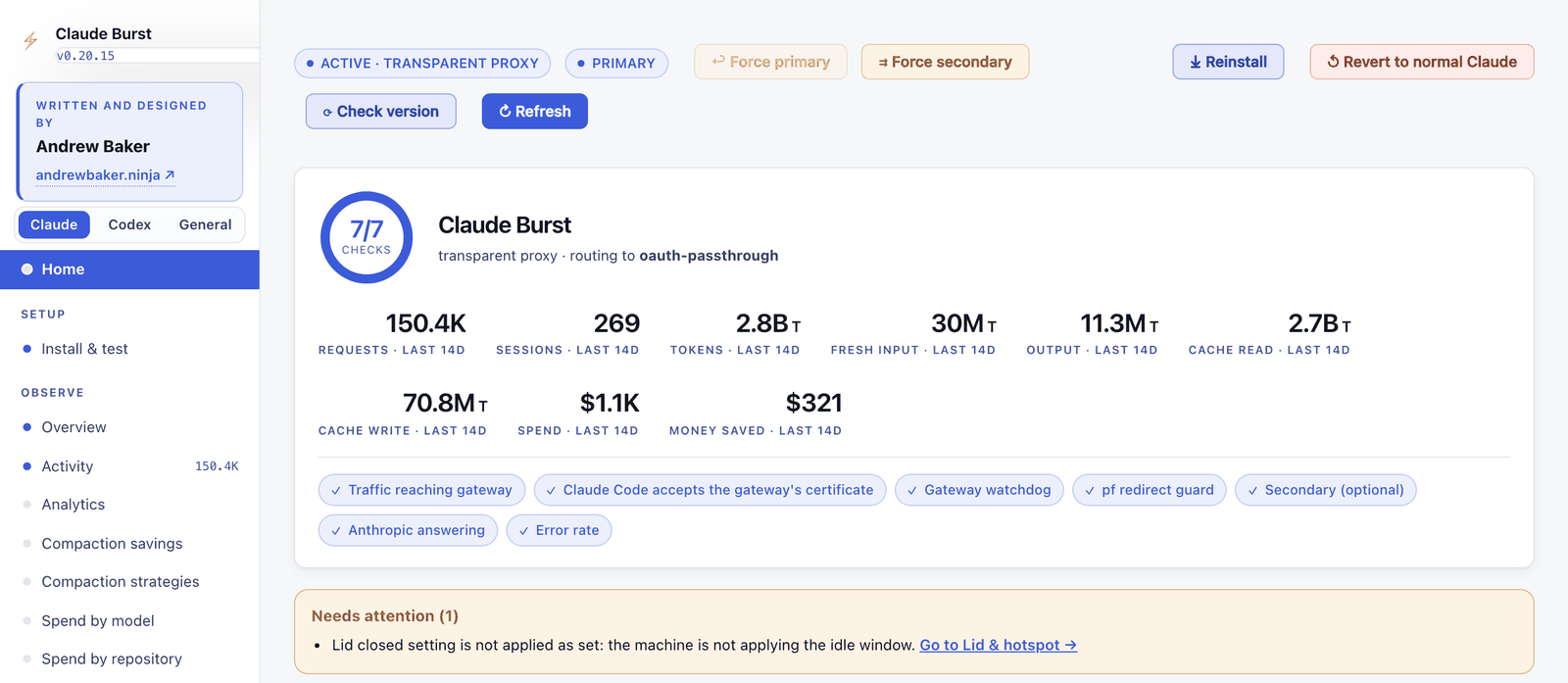
Claude Burst is a free local gateway that sits between Claude Code and Anthropic on your Mac. Claude Code talks to it exactly as it talks to Anthropic, so nothing in your workflow changes. It keeps you working past usage limits, compacts long sessions without the pause, stops parallel sessions treading on each other, and shows what everything costs.
It is for people who use Claude Code heavily on a Mac, on a Pro, Max or Enterprise plan or a metered API key. It is young and macOS only: try it on a non critical account first. Revert to normal Claude on the dashboard takes it out of the path in one click.
- What it doeswhat
- Installinstall
- Opening the dashboarddashboard
- Pauseless compactionpauseless
- Intelligent compactionintelligent
- Context inspectorcontext
- Session coordinationcoordination
- Usage panelpanel
- Spend and analyticsspend
- Failover and pricingfailover
- Codexcodex
- Turning it off and uninstallinguninstall
- Questionsfaq
- Problemsproblems
- More helpmore
The ops layer for Claude Code.
Your Claude login stays the main credential. Burst adds the parts you need to run Claude Code all day. Most are off until you switch them on.
Keep working past a limit
When Anthropic says a model’s allowance is used up, Burst sends that model’s requests to another Claude model on your plan, then to a paid secondary you chose. It returns to your subscription at the reset time.
Pauseless compaction
Burst summarises long sessions in the background and swaps the summary in on your next prompt. No pause, and Claude Code keeps its full history.
Intelligent compaction
Burst learns the cheapest point to compact for each repository from its own last 14 days, and says why in words.
Session coordination
Several sessions can edit one repository without overwriting or committing each other’s work.
Session handover
In a repository that opts in, each session reads HANDOFF.md when it starts and writes it when it closes.
Lid shut, offline
Claude Code keeps running with the lid closed, reachable through Remote Control, and Burst joins your phone hotspot when Wi-Fi drops.
Automask
Keys, tokens, passwords and your own word list are masked before a request leaves the Mac. Off by default.
Codex
OpenAI’s Codex, signed in with ChatGPT, can go through Burst too, for tokens, context and plan limits.
See everything
A dashboard for health, spend, savings and alerts, plus a usage panel beside each session.
One line: Claude Code installs it.
You need macOS, Go 1.23 or later, the Xcode Command Line Tools (xcode-select --install) and Claude Code logged in.
- 1Open Terminal: press Cmd Space, type Terminal, press Return.
- 2Paste this line and press Return:
claude "$(curl -fsSL https://raw.githubusercontent.com/andrewbakercloudscale/claude-burst/main/SETUP_PROMPT.md)"
- 3Claude Code opens with the setup prompt. It tells you in three lines what will change and waits for your go ahead, then checks what is needed.
- 4It hands you one install line to paste into your own terminal, because it asks for your password. Claude Code never runs sudo itself.
- 5It checks the gateway and dashboard answer, then reports. Restart Claude Code for Burst to take effect.
Already in a Claude Code session? Paste the text of SETUP_PROMPT.md instead. If you use Ghostty Dock, its Compact button offers Set Up Claude Burst, which runs the same line.
Two modes
Transparent (recommended)
Redirects api.anthropic.com on this Mac to Burst, with a local certificate. Claude Code’s Remote Control keeps working. Needs your password once.
Base-url
Sets ANTHROPIC_BASE_URL to Burst. No password, but Claude Code turns Remote Control off in this mode.
By hand
Clone the newest release tag from the Releases page, then:
git clone --branch <newest tag> https://github.com/andrewbakercloudscale/claude-burst.git
cd claude-burst
scripts/verify-release.sh .     # optional: checks the release signature
./install.sh                    # asks: transparent (recommended) or base-url
claude-burst status
claude-burst open               # the dashboard
Optional: a secondary to overflow to when a limit is hit. Skip it on a single plan. Together AI, OpenRouter, any OpenAI compatible endpoint or Amazon Bedrock work. For example:
claude-burst configure --secondary openai-compatible \
  --secondary-base-url https://api.together.xyz/v1 --secondary-model zai-org/GLM-5.3
TOGETHER_API_KEY='your-key' claude-burst keychain-set --provider together
launchctl kickstart -k gui/$UID/ninja.andrewbaker.claude-burst
What it changes on your Mac
~/.claude/settings.json
Hooks for the features you switch on, and ANTHROPIC_BASE_URL in base-url mode.
LaunchAgents and the binary
One runs the gateway, one the support console. The binary goes in ~/.local/bin.
The Claude Burst app
In ~/Applications. It opens the dashboard. claude-burst app remove deletes it.
~/.codex/config.toml
A marked block at the top, only when you route Codex through Burst.
/etc/hosts, a pf rule and a local CA
Transparent mode only. The CA is limited to api.anthropic.com.
Power settings
pmset and a root LaunchDaemon, only if you turn on lid keep-awake. Off by default.
./install.sh uninstall removes all of it and checks it is gone.
Cmd Space, burst, Return.

The installer puts a Claude Burst app in ~/Applications. Open it from Spotlight or Launchpad, or drag it to the Dock. It opens the dashboard at http://127.0.0.1:7788, or the support console when the gateway is down. claude-burst open does the same from a terminal.
Three tabs sit at the top left: Claude, Codex and General. Under Claude, the sections are grouped as Setup, Observe, Context, Routing and Sessions. The bar along the top shows the mode and route, with Force primary, Force secondary, Reinstall and Revert to normal Claude.
Install and test has three checks to run after installing: Test connection, Test secondary and Send test message, which traces one tiny real message down the same path Claude Code uses.
Long sessions, no pause.
Every turn resends the whole conversation, so a turn at 400k tokens uses your limits about four times as fast as one at 100k. Claude Code only compacts near the end of its 1M window, and stops the session while it does. Burst compacts much earlier, in the background, and swaps the summary in on your next prompt.
- Nothing is lost. Burst shortens only what is sent. Claude Code keeps every message, so dropping the summary or rewinding sends the full history again.
- No waiting. The summary is written from the cache (about $0.20 at 400k) while you work. An experimental switch swaps it in mid turn.
- You see it. A line under your prompt says how much smaller the context got, for example 666k to 78k.
- On demand. Type /compact-async in any session.
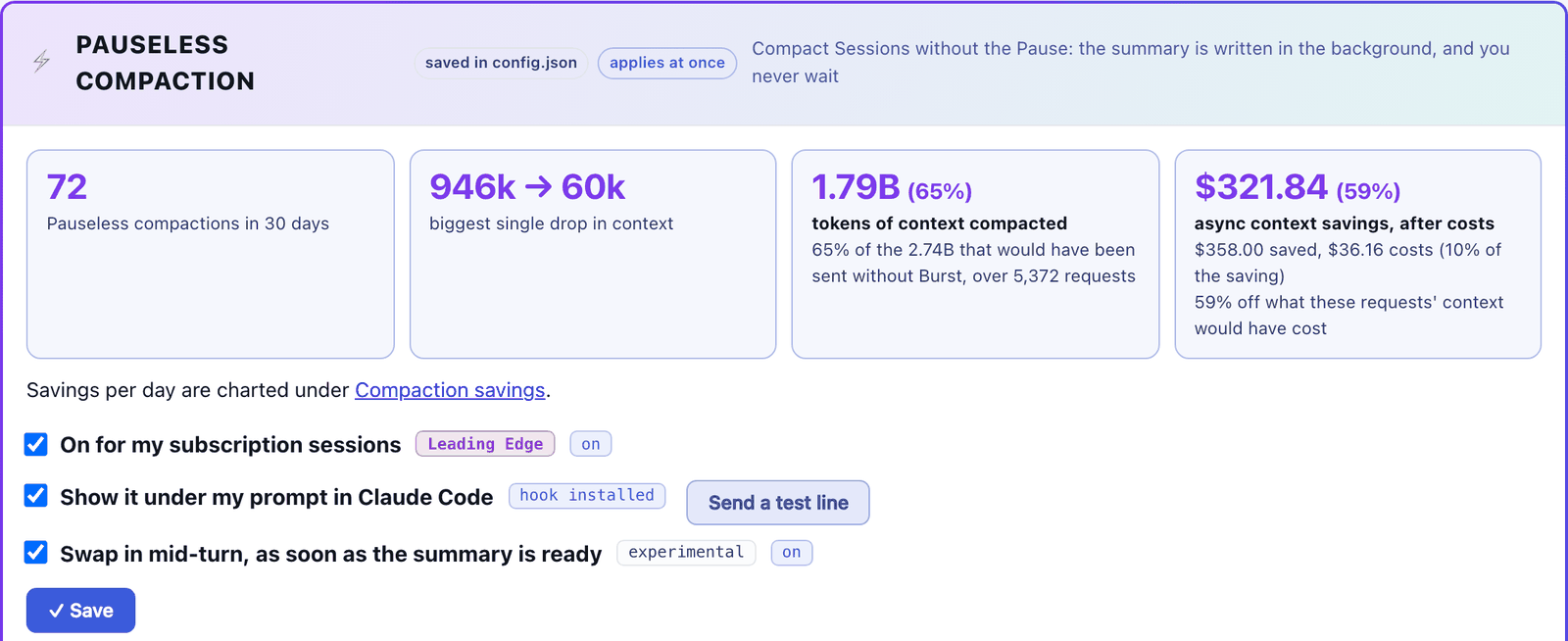
On a subscription the saving is API equivalent value, not money back: your bill does not change, your limits last longer. In two days of real use with long Opus sessions it saved about $26 a day of that value, after the summaries’ own cost.
The right size, learned per repository.
Compact too early and you pay for summaries you did not need. Too late and every turn re-reads a context bigger than it had to be. The right point differs by repository. Set Compaction mode to Intelligent and Burst works it out from each repository’s last 14 days.
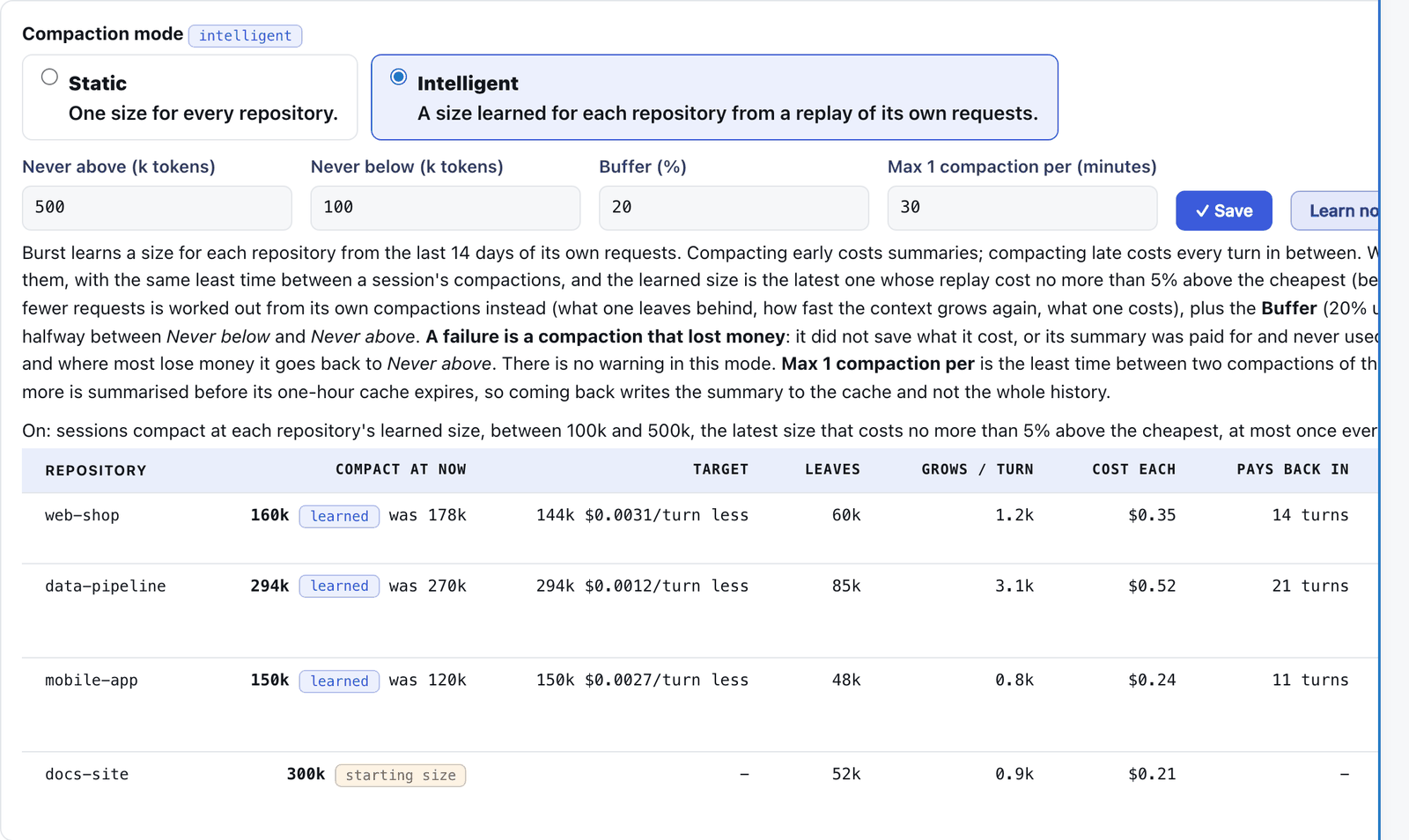
- Measured, not guessed. It replays every size from 100k to 500k over what the repository really sent, and picks the latest that cost no more than 5% above the cheapest.
- Careful with money. A 100k floor, a 500k ceiling and a 20% buffer. A new repository starts at 300k.
- Never loses twice. A compaction that did not pay for itself raises that repository’s size by 10% at once.
- Explains itself. Every row ends with its reason in a sentence. Learn now recalculates; a per repository override always wins.
What a session’s context is made of.
Pick a session and see every part of what Burst last sent: tool results, tools, replies, instruction files and prompts, with what each costs. Items worth a look are flagged, such as large old output, an out of date copy of a file, or an instruction file from outside the repository. Remove takes one out of later requests; Restore puts it back. Claude Code keeps its own copy either way.
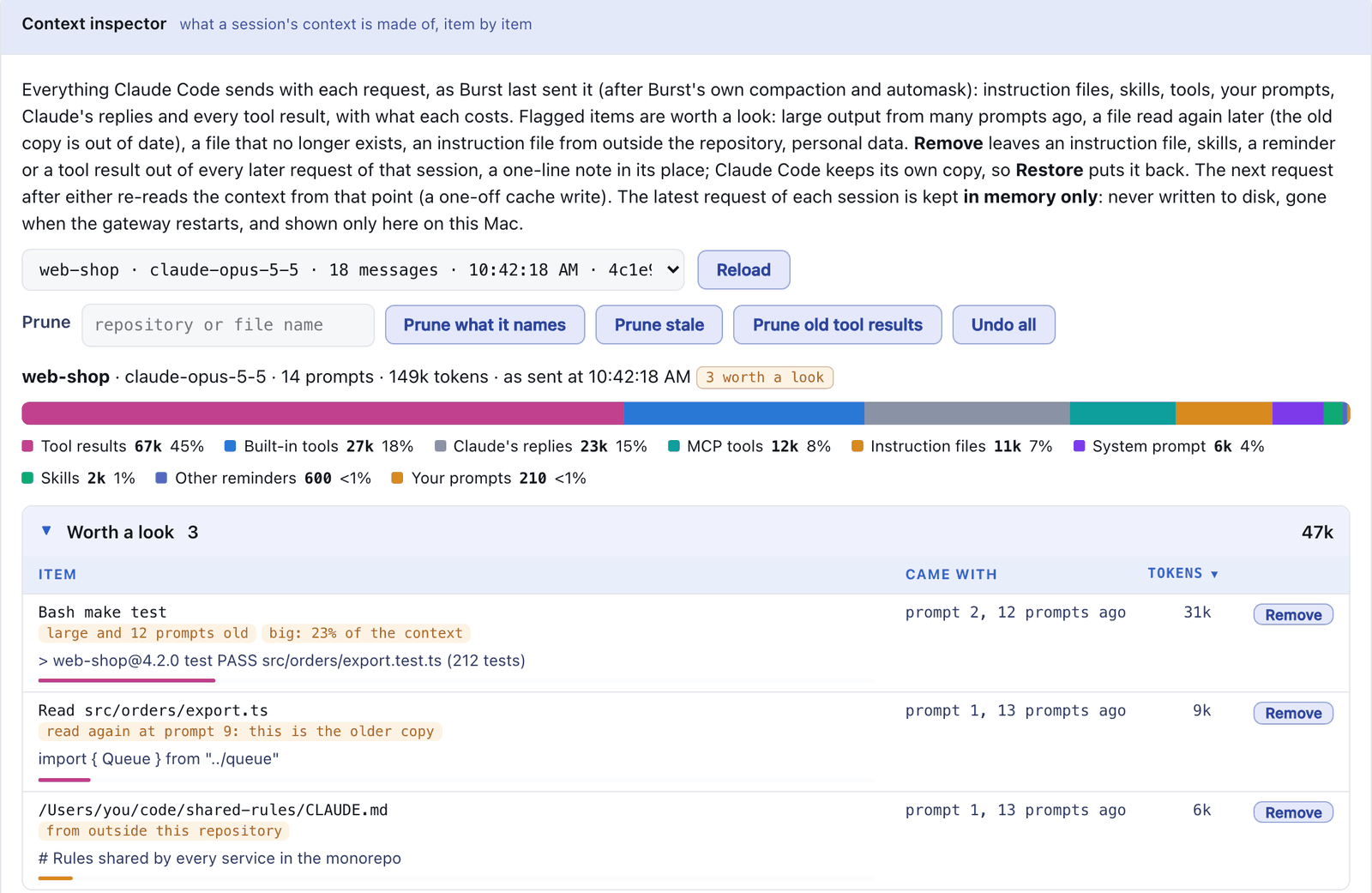
Commands inside a session
/compact-async
Compacts now, in the background, with no pause.
/compact-async-full
Also shrinks what Claude Code holds, using the summary Burst already wrote.
/burst
A pane with the usage summary and Burst’s route, context and compaction state.
/context-bar
Shows or hides the bar of what the context is made of.
/burst-dump
Lists everything in the context Burst last sent: what the cache holds.
/burst-prune stale
Takes out old copies of files read again, results for deleted files and large old results.
/burst-prune results
Takes out every tool result from before the latest prompt. Good when a task is finished.
/burst-prune undo
Puts back everything pruned from this session.
/claude-burst-revert
Turns Burst off and sends Claude Code straight to Anthropic. Works while the gateway is down.
/claude-burst-reinstall
Fetches the newest Burst and installs it again. Works while the gateway is down.
Several sessions, one working tree.
Several Claude Code sessions, and their subagents, can edit the same repository without overwriting, sweeping up or shipping each other’s uncommitted work. Nobody waits.
- The first session to edit a file becomes its master and is responsible for committing it.
- Other sessions can still edit it; the master is asked to commit their changes first.
- Blocked while another session has uncommitted work: overwriting a whole file, sweeping commits such as git add -A, and running a deploy script.
- A session commits the files it masters before it stops, on this Mac only, never pushed.
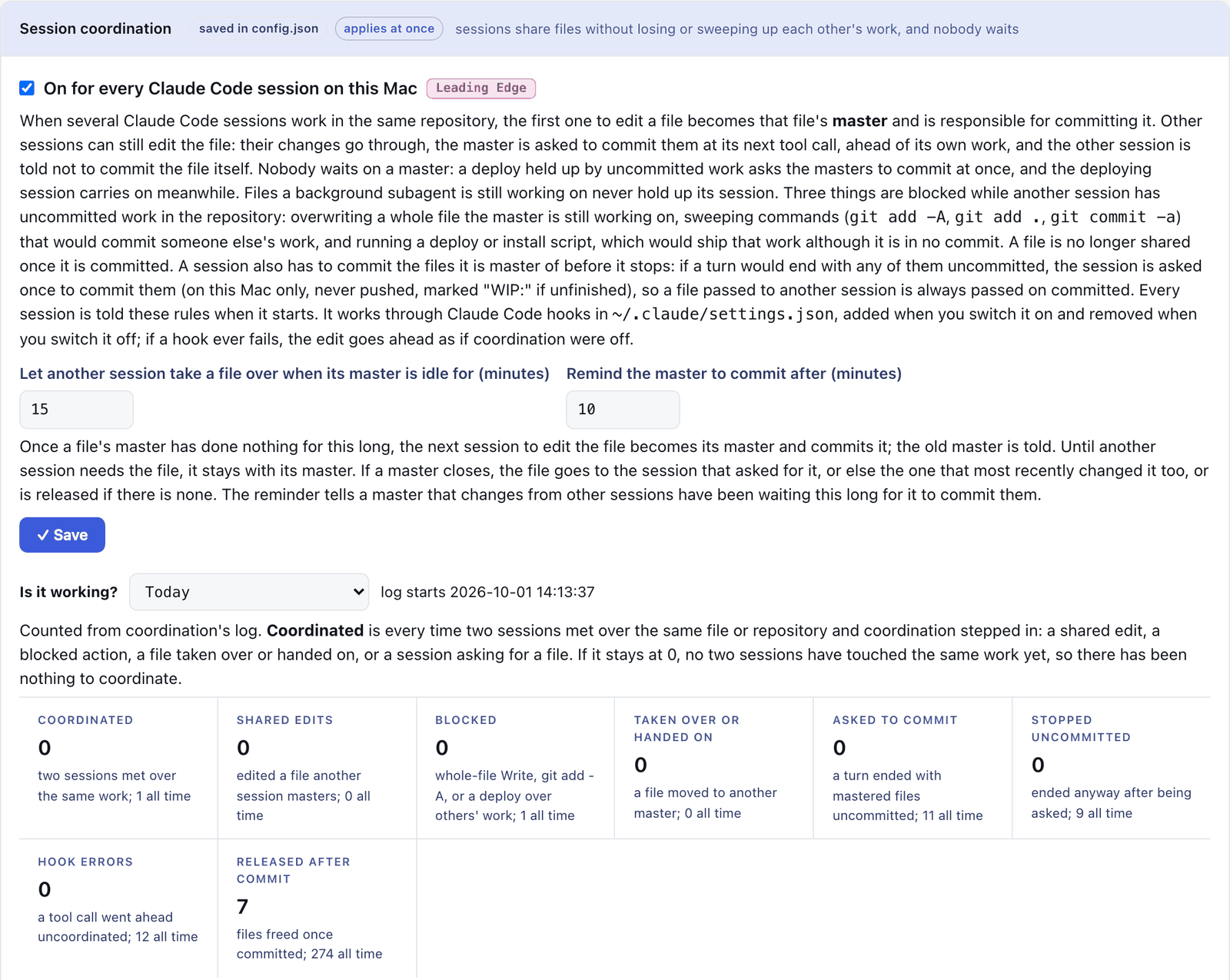
Session handover sits beside it: in a repository that opts in, each session reads HANDOFF.md at the start and writes it at the close, so the next one picks up where the last left off.
The numbers beside each session.
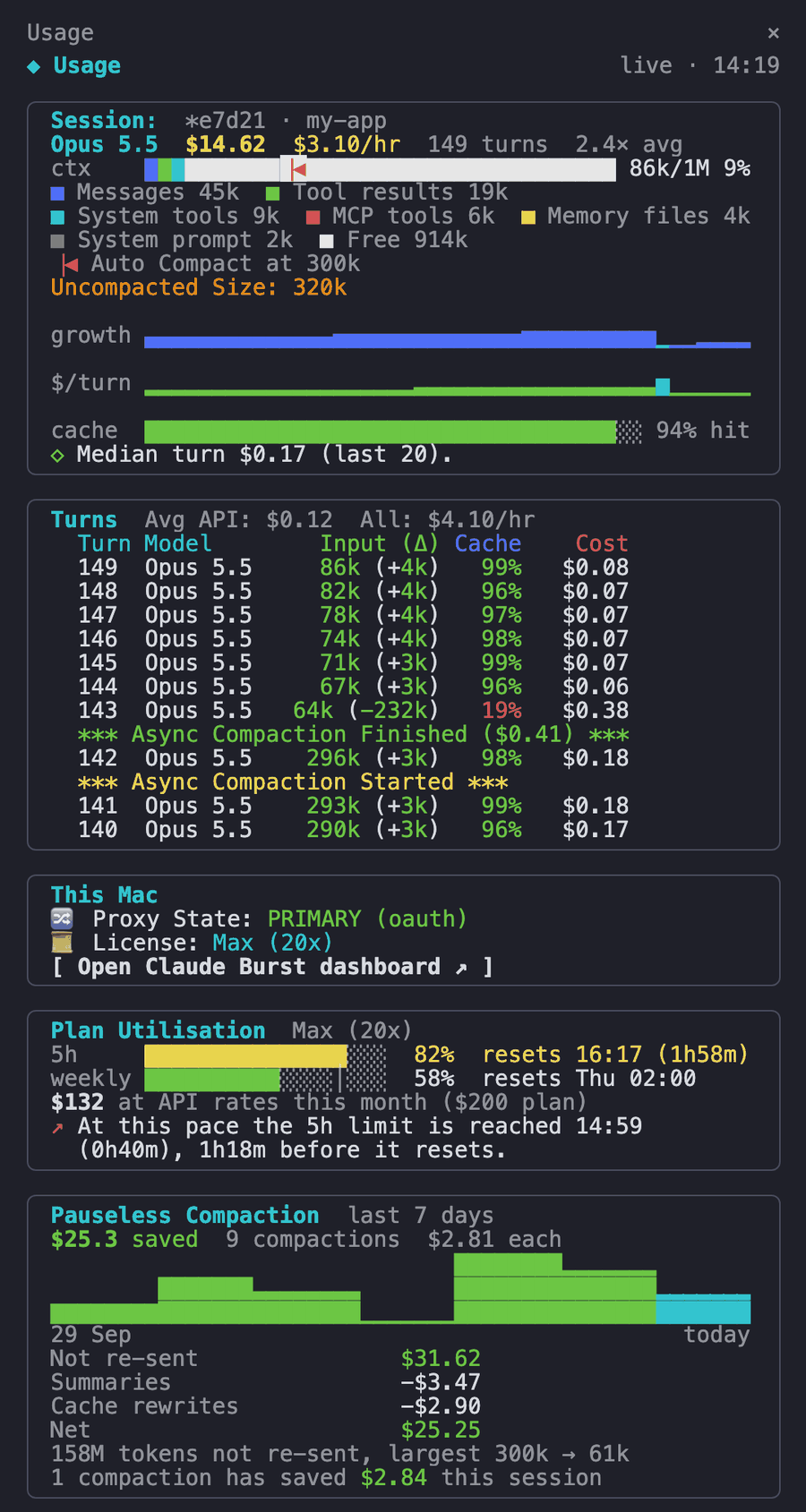
The installer adds the usage panel, a Claude Code mod, which shows a sidebar beside each session:
- the session’s cost and cost per hour
- a context bar of what Burst really sends, with the compaction point marked
- each turn’s tokens, cache hit and cost, with compaction Started and Finished rows
- Burst’s route, and how much of your 5 hour and weekly limits is used
- what Pauseless Compaction saved over the last 7 days
The burst-session mod also puts Burst’s route and context above the prompt, and shows alerts as toasts. /burst opens the summary in a pane. Set CLAUDE_BURST_PANEL=no at install to skip the panel.
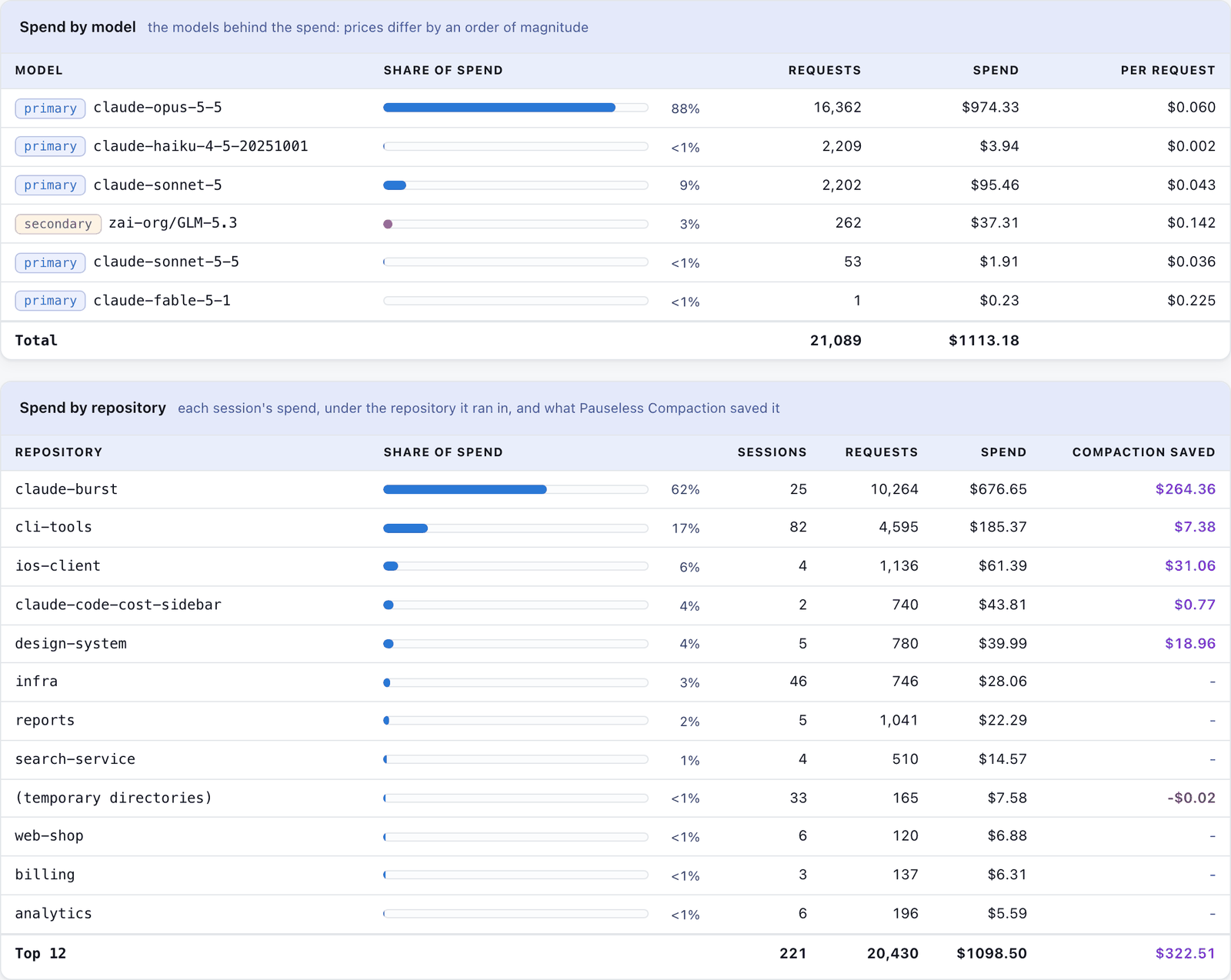
Where the money goes.
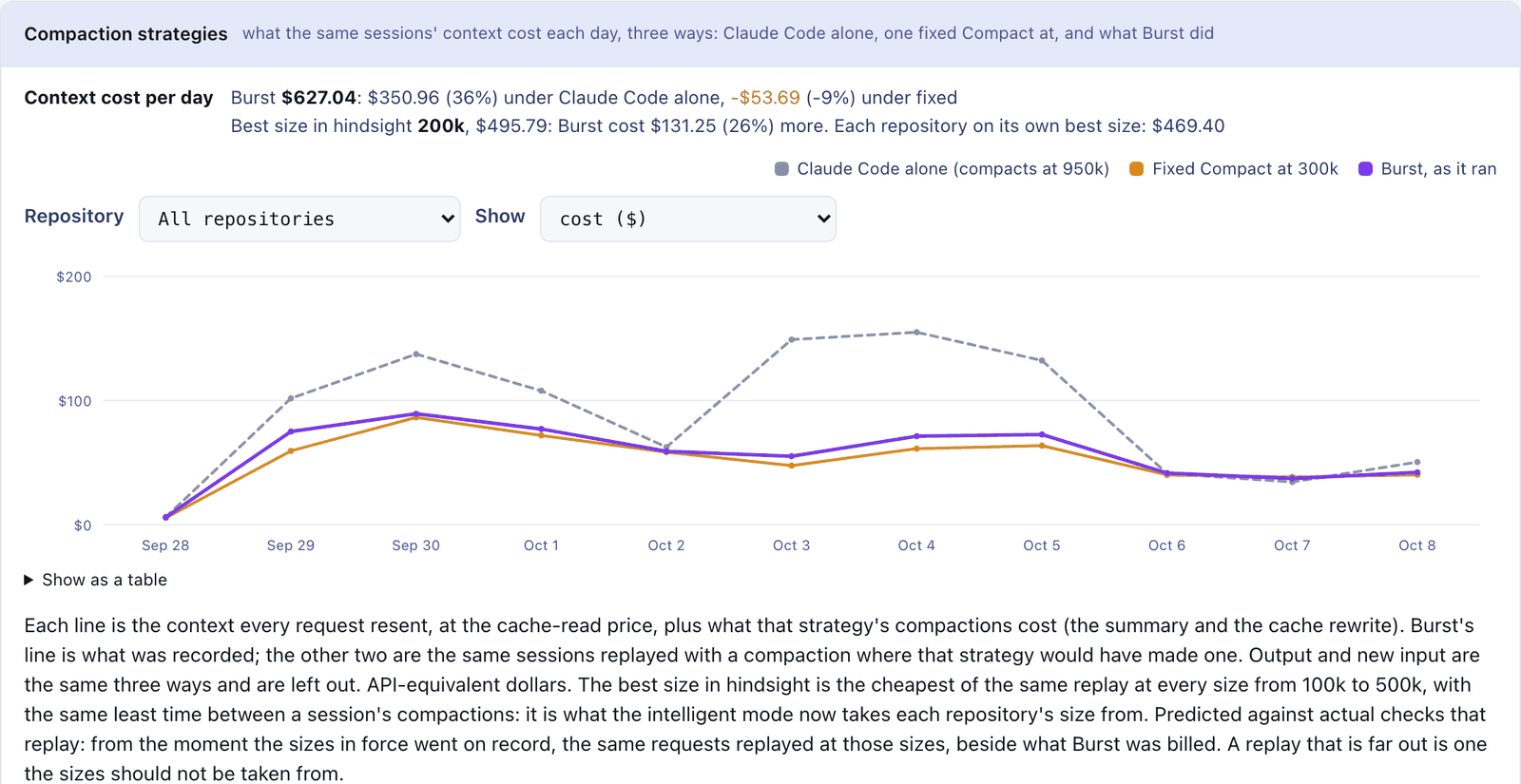
The Observe group shows daily activity, latency and error rate, compaction savings, spend by model and by repository, and a Usage view you can filter down to single requests. Costs are at API prices you can edit, so on a subscription they show value used, not your bill.
Keep working past a limit.
Burst watches Anthropic’s own rate limit headers. Only when Anthropic says a model’s allowance is used up does it move that model’s requests: first to other Claude models on your plan, then to the secondary you configured. It returns to your subscription when the reset time arrives. A bare 429 never triggers it, and old tool output is pruned from overflow requests before they are sent.
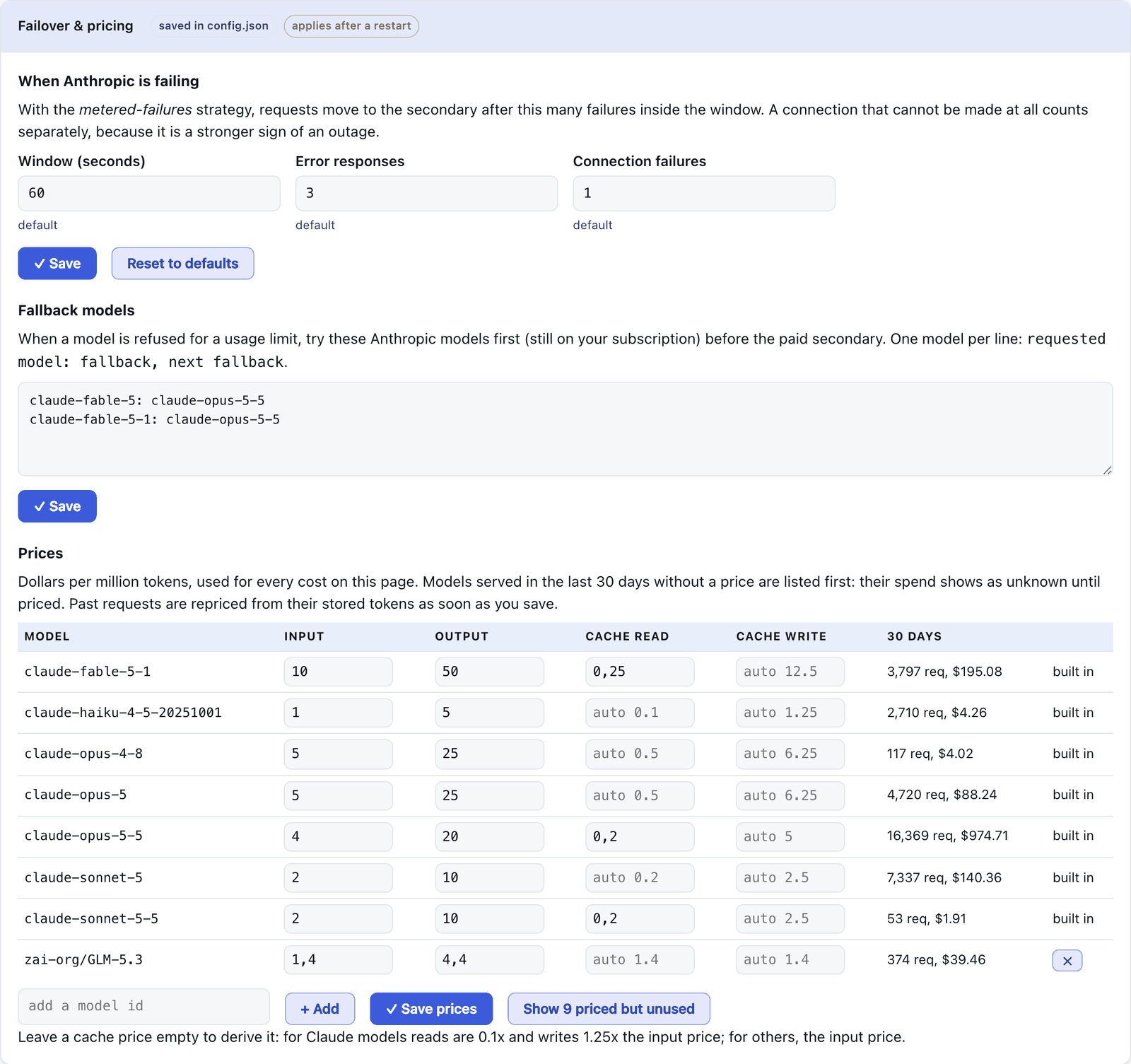
With a metered API key as the primary, failover waits for sustained failures instead of a limit header. Force secondary at the top of the dashboard routes there on purpose, for testing.
OpenAI’s Codex too.
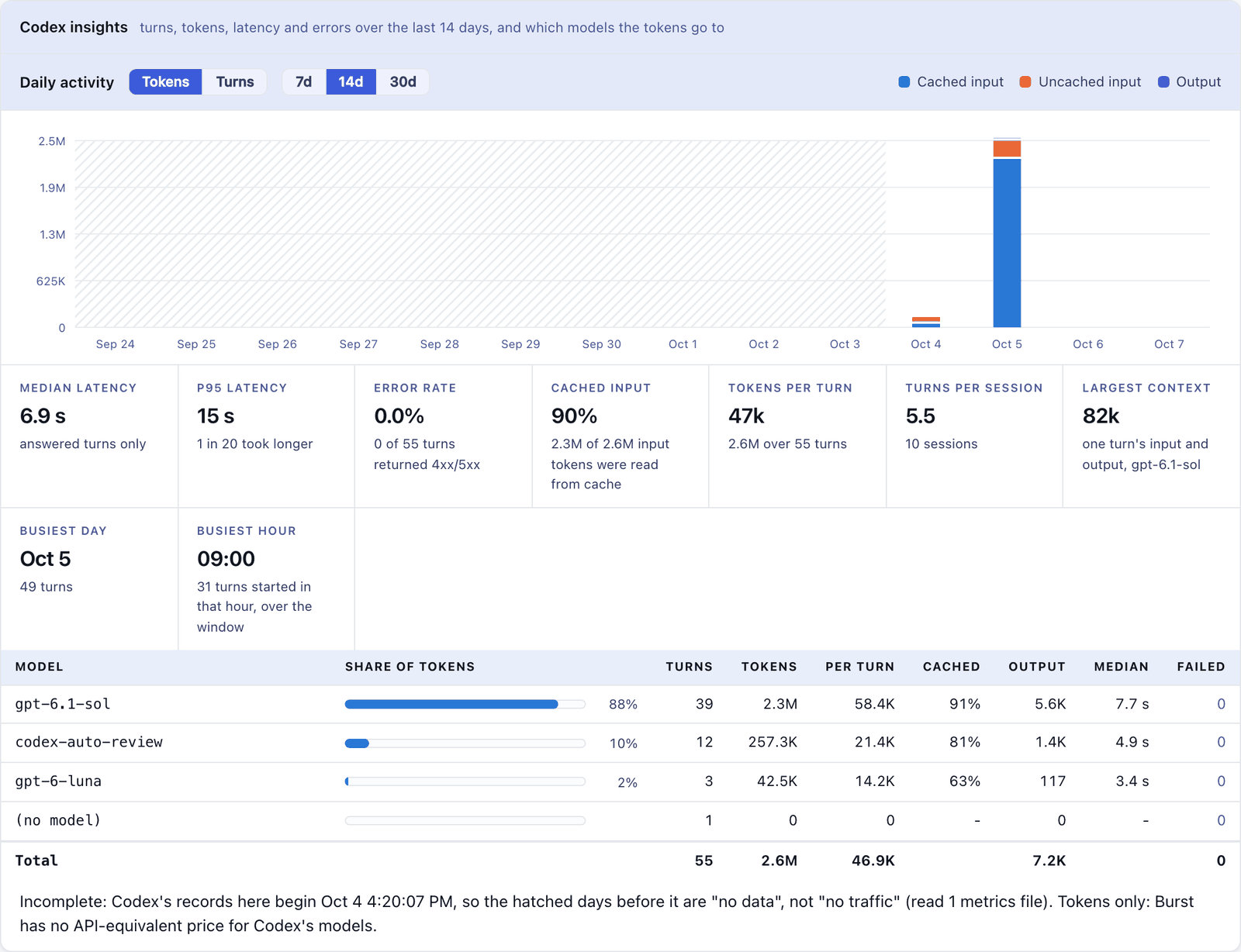
Codex, the CLI and the ChatGPT app, signed in with ChatGPT, can route through Burst. On the dashboard’s Codex tab click Route Codex through Burst, or:
claude-burst codex enable    # route Codex through Burst
claude-burst codex status
claude-burst codex disable   # straight to ChatGPT again
Then restart Codex. Requests reach ChatGPT unchanged. The tab shows tokens per turn, each session’s context against its window, the ChatGPT plan’s limits, a path trace and a test turn. Only model calls go through Burst; sign in, plugins and cloud tasks go to ChatGPT directly.
Keep a session running in your bag.
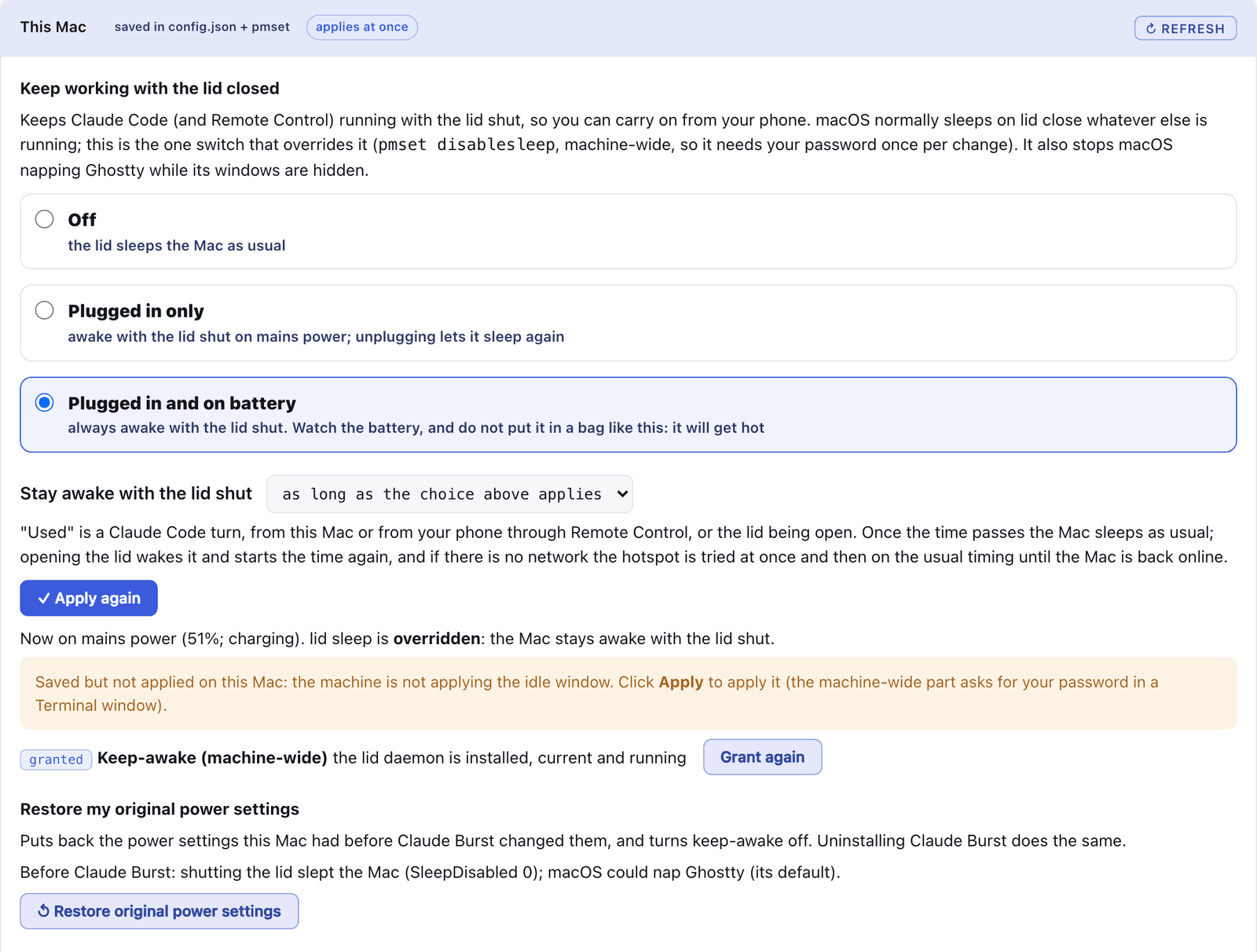
Under General, This Mac, choose to keep working with the lid closed: off, plugged in only, or plugged in and on battery. Claude Code stays reachable from your phone through Remote Control. Pick your phone’s hotspot and Burst joins it when the Mac goes offline. Off by default; it needs your password once per change.
Off in one click, gone in one line.
Turning Burst off sends Claude Code straight to Anthropic. Sessions already open keep working.
Revert to normal Claude
The button at the top of the dashboard. Takes Burst out of the path in one click.
/claude-burst-revert
From inside Claude Code. It makes no model request, so it works when the gateway is down.
burst-off
From any terminal. Undo with claude-burst enable, or burst-reinstall for the newest build.
Turn Burst off
On the support console at http://127.0.0.1:7789/, which is also where you turn it back on.
Uninstall
From the folder you installed from:
./install.sh uninstall           # keeps ~/.config/claude-burst
./install.sh uninstall --purge   # also deletes ~/.config/claude-burst
It lists the root steps first and asks for your password once, then removes the watchdog, the hooks in ~/.claude/settings.json, the LaunchAgents and the binary. It ends with a check and names any leftover with the command that removes it. Your secondary key stays in the Keychain and the usage panel has its own uninstaller. ROLLBACK.md lists each change with its own undo, to remove one part and keep the rest.
Common questions.
Who is it for?
People who use Claude Code heavily on a Mac, on a Pro, Max or Enterprise plan or a metered API key, and want to keep working through limits, long sessions and closed lids.
Does my bill change?
No. On a subscription the savings are API equivalent value: your limits last longer, the bill stays the same. A secondary provider, if you add one, bills you directly.
I have one plan only. Is it still useful?
Yes. No secondary is needed. Compaction, fallback models on your own plan, handover, coordination and the dashboard all work. With nowhere to overflow to, Anthropic’s own responses, a limit included, reach Claude Code unchanged.
Is it safe?
It is a man in the middle for your Claude traffic by design, and it is young and experimental: try it on a non critical account first. It listens on loopback only, the local CA is limited to api.anthropic.com and never leaves the Mac, and the logs hold metadata only, no prompts or code.
Does it break Anthropic’s terms?
It is built around one subscription per person. It does not rotate accounts, hide quota signals or fake headers. When a limit is reached it tries other Claude models on the same plan, then makes a separate, paid request through a provider you pay for. Organisations should still check their own contracts.
What do I need?
macOS (developed on macOS 26, expected to need 14.4 or later), Go 1.23 or later, the Xcode Command Line Tools, zsh and Claude Code logged in. Ghostty is assumed by the lid shut feature and the usage panel’s split; everything else works in any terminal.
If something is not right.
Something is broken and I do not know what
Open the support console at http://127.0.0.1:7789/. It runs as its own process, so it answers when the gateway does not. It shows which part is down, the latest log lines, every alert and action, and buttons to Restart, Repair, write a Diagnostic report or Turn Burst off.
Claude Code cannot reach Anthropic
Run the Repair line (below). It stops anything stale on Burst’s ports, reinstalls in the same mode, checks a request gets through and opens the dashboard. If you need to work right now, run /claude-burst-revert or burst-off first.
An open session times out after an update
Sessions started before the certificate changed time out until restarted. Repair finds them and offers to stop them. Restart with claude --resume or claude --continue; the history is kept.
macOS asks for Desktop or Documents access after every update
Run scripts/signing-setup.sh once. It signs builds with a local certificate so one Allow lasts. The dashboard’s Permissions section shows what macOS has allowed.
Remote Control has gone
Claude Code turns Remote Control off when ANTHROPIC_BASE_URL points anywhere but Anthropic. Switch to transparent mode from the dashboard’s Install section.
I need help from someone else
Run the Diagnose line. It changes nothing, needs no password, redacts secrets and copies a report to the clipboard, with PASS or FAIL for each check and what to run.
Repair
Syncs with GitHub, reinstalls in the same mode and checks a request gets through. It asks before stopping any session.
curl -fsSL https://raw.githubusercontent.com/andrewbakercloudscale/claude-burst/main/scripts/repair.sh | bash
Diagnose
Changes nothing and copies a redacted report to the clipboard.
curl -fsSL https://raw.githubusercontent.com/andrewbakercloudscale/claude-burst/main/scripts/diagnose.sh | bash
Everything else is on GitHub.
The README covers every setting, the trust and risk model, providers, transparent mode and the roadmap. Claude Burst is free and MIT licensed, and pairs with Ghostty Dock, which shows every session as a row with a Compact button.