Security groups fitted to the traffic they carry.
sg-tightener records every security group in an AWS account, or a whole OU, in a local database, then reads your VPC flow logs to show which rules allow far more than is ever used and what each group should allow instead. It starts in surveillance mode: it tells you, and changes nothing. When you are ready it applies, per account, per group or per asset, after checking you have the permissions, with a second person approving and every change in an audit trail.
- Installinstall
- Baseline every groupbaseline
- Find over-provisioningreview
- Rejected trafficrejected
- A group for one assetassets
- The consoleconsole
- Problemsproblems
Python 3.9 and AWS credentials.
git clone https://github.com/andrewbakercloudscale/sg-tightener.git
cd sg-tightener
./install.sh
source .venv/bin/activate
Reading needs only iam-policy-read.json; applying needs iam-policy-write.json, scoped to one VPC. Access keys or AWS IAM Identity Center (SSO) both work. The tools:
sg_db.py
The local database: every group and rule, the modes, permission checks, change requests, approvals and the hash-chained audit trail. Import, reconcile, apply and revert.
sg_review.py
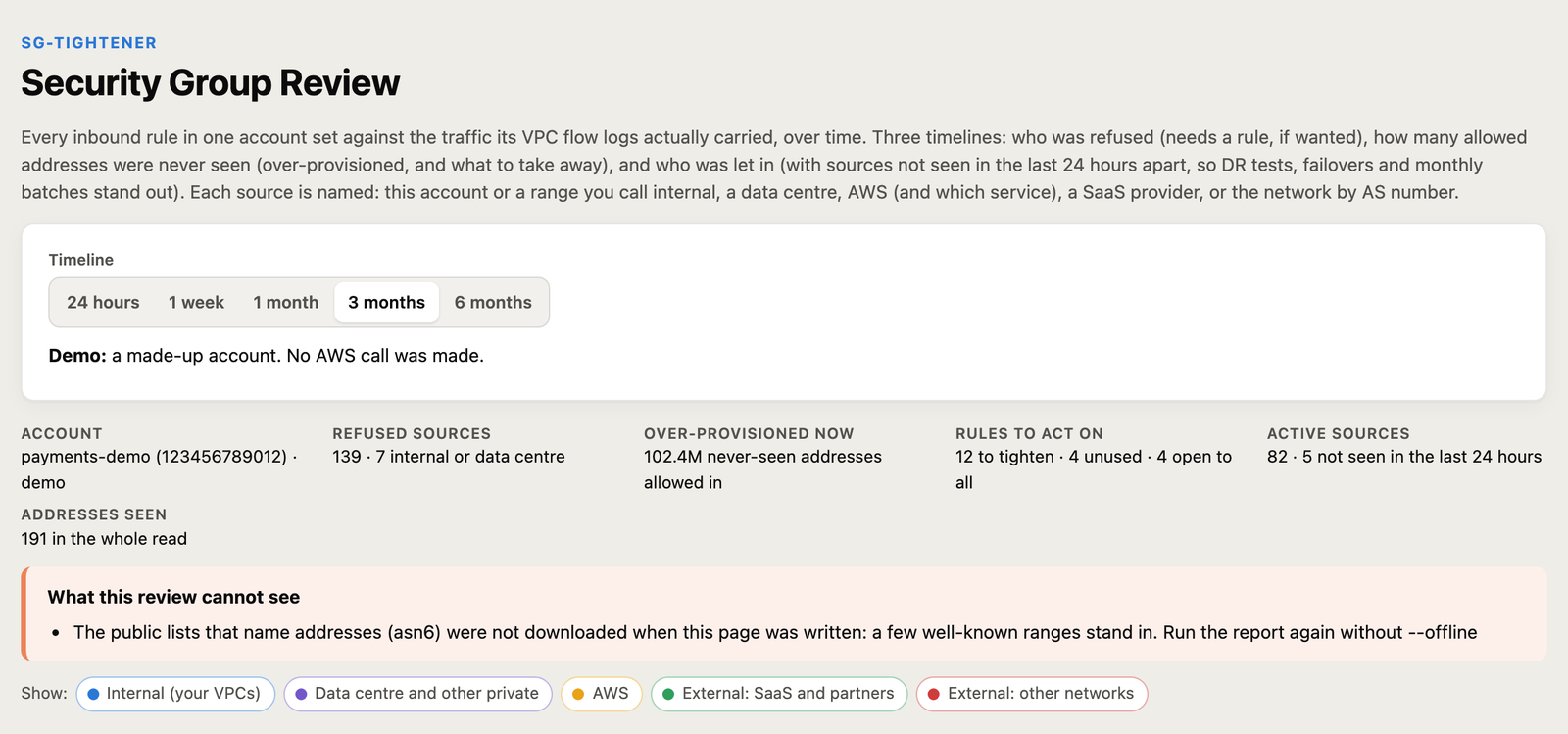
The Security Group Review: one HTML page per account with three timelines (refused, over-provisioned, allowed), a verdict on every source, and watch alerts on rejected traffic.
sg_tightener.py
Learn from flow logs, plan the replacement rules (writing nothing), apply and revert.
sg_assets.py
One asset gets a group of its own, built only from the traffic that reached it.
sg_console.py
A local web page for every account: groups, assets, change requests, the audit trail and every rejected flow across an OU.
Every group and rule, in a local database.
aws sso login --profile prod        # or plain access keys
python sg_db.py import --regions eu-west-1 --profile prod
python sg_db.py import --regions eu-west-1 --ou-id ou-ab12-cdef3456   # every account in an OU
The database (~/.sg-tightener/sg.db) holds every rule and every network interface with its groups. Run sg_db.py reconcile hourly: any change made outside the tool, in the console, the CLI or Terraform, is recorded with who made it and reported.
What each rule allows, against what it carried.
python sg_review.py read   --regions eu-west-1 --days 90
python sg_review.py report --onprem "10.200.0.0/16 Johannesburg DC"
python sg_review.py watch  --regions eu-west-1 --slack "$WEBHOOK" --loop
The review is one HTML page per account. It counts the addresses each rule allows that were never seen, and Extract rule writes the rule a group should have from the sources that actually used it. sg_tightener.py plan does the same for a whole region and writes a signed plan, never touching AWS.
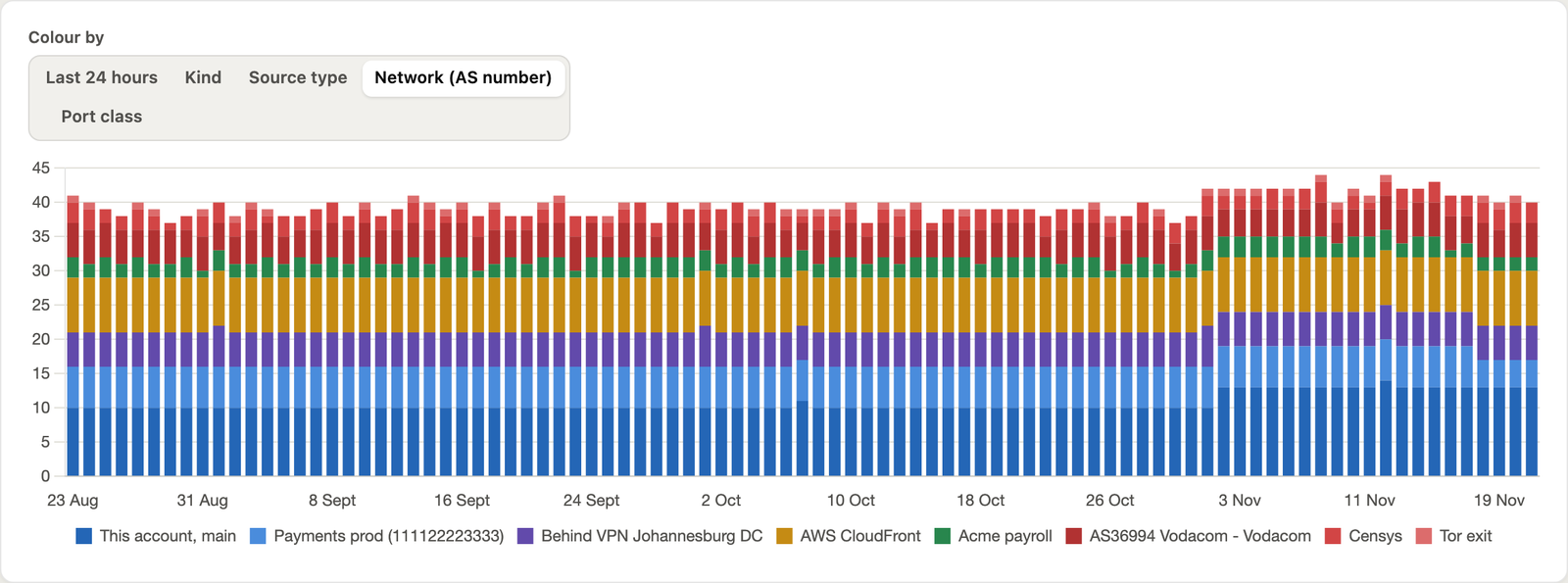
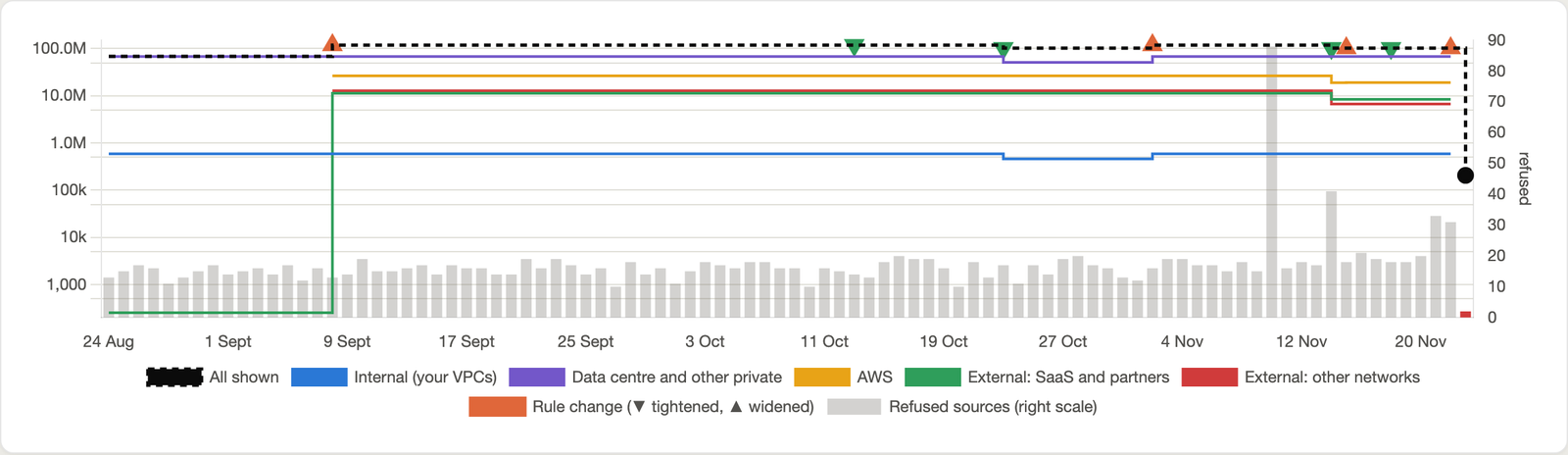
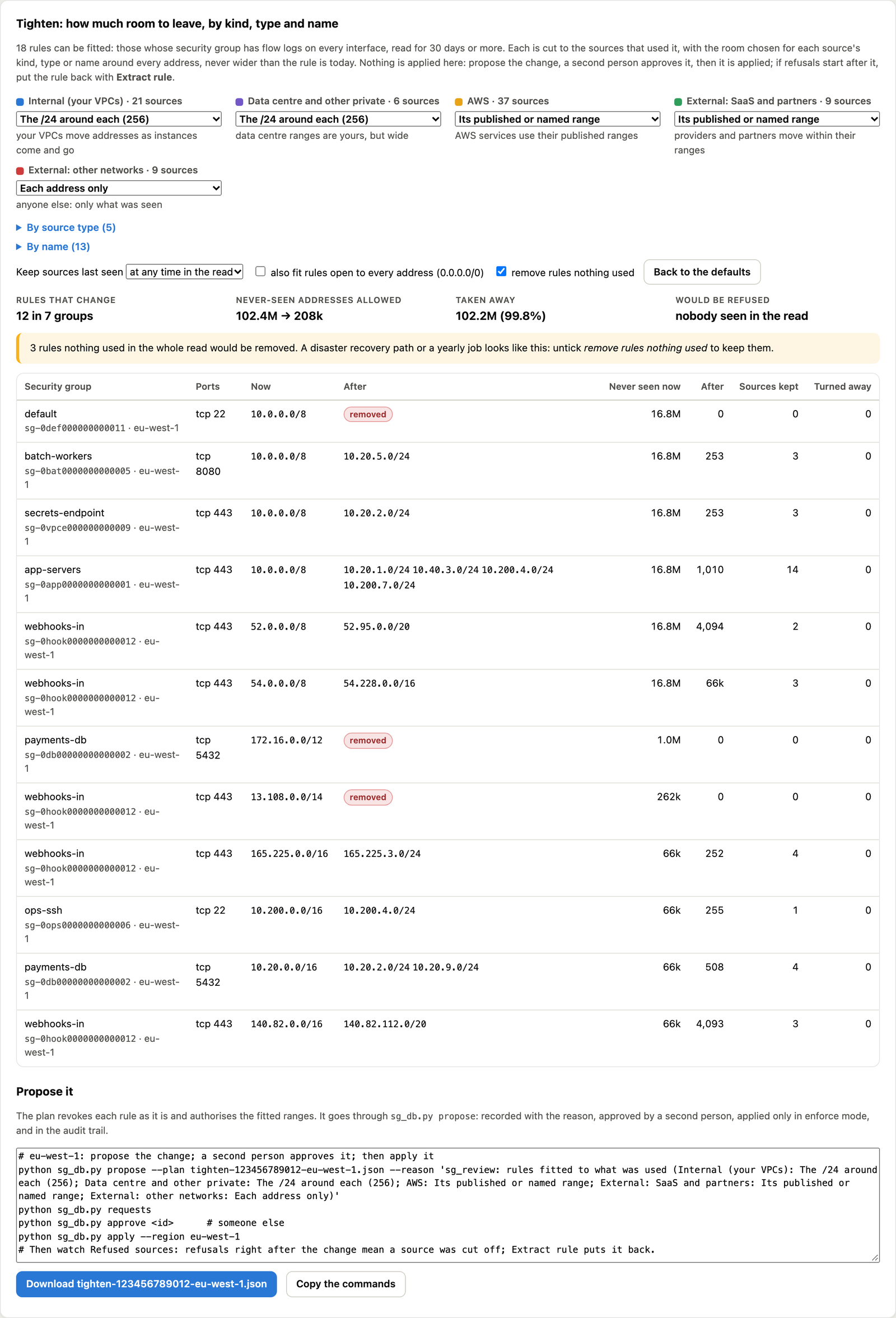
Tighten on the timeline (since 5.1.0). Under the over-provisioned graph, pull each rule back to the sources that used it, choosing how much room to keep by kind (internal can keep a /24, the internet only the exact addresses), by source type, or by name (Lambda or Zscaler keep their published range). The graph drops to an After point and shows how many sources the change would refuse. Propose it from the console (Review and tighten), a second person approves, and it is applied in enforce mode. Each tightening is a ▼ on the timeline: if refusals spike after one, Extract rule puts the source back.
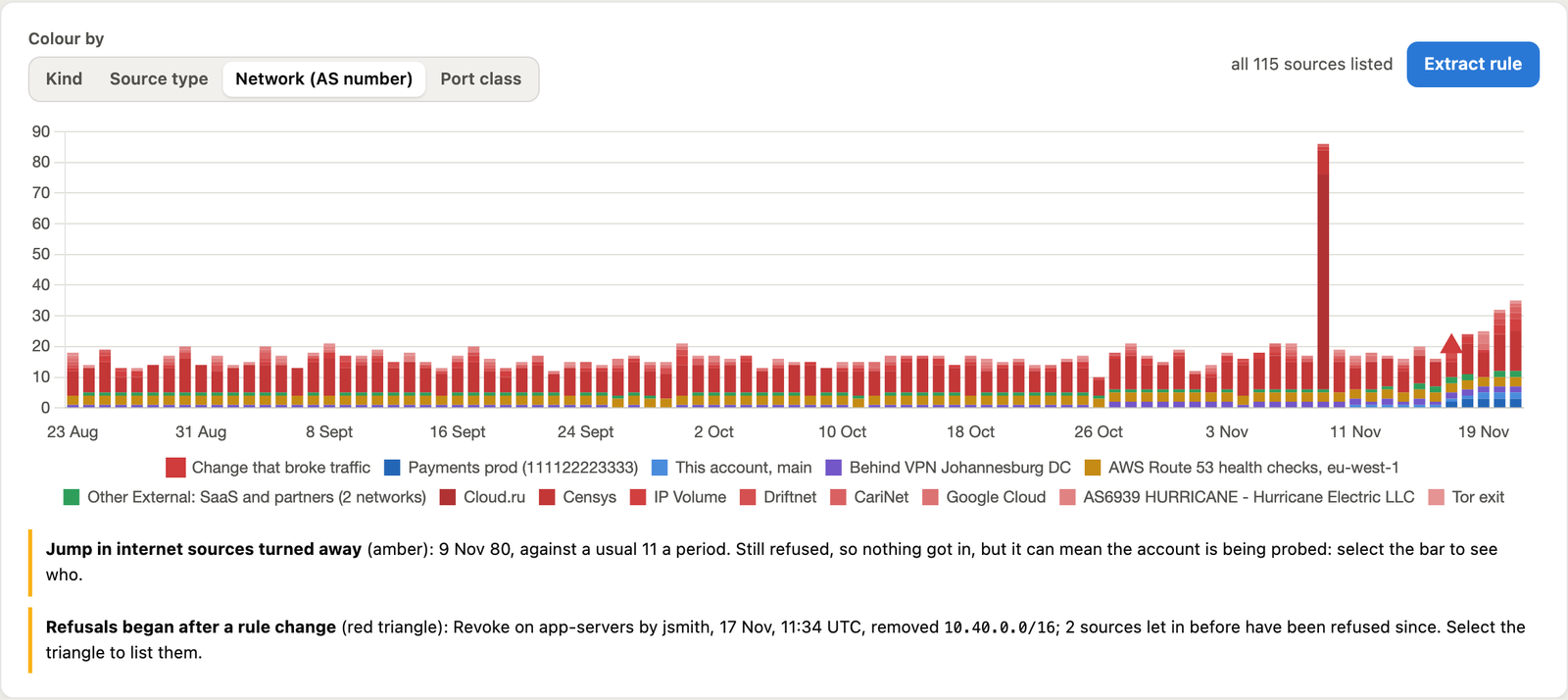
Who was turned away, and should you care.
Internal or external
Your VPCs, ranges you call internal (a data centre, a VPN), AWS and which service, a SaaS provider, or the network by AS number. IPv6 too.
Which port
Every port is classed: remote admin, databases, web and so on, with risky ones marked.
Is it scanning you?
A source sweeping many ports or addresses is marked scanning, with the count.
Seen before?
Each address keeps its first sighting. New means first seen in the last 7 days with at least 14 days of flow logs before it.
The verdict
Defence working, needs a rule, change that broke traffic, and so on, worst first, with what to do.
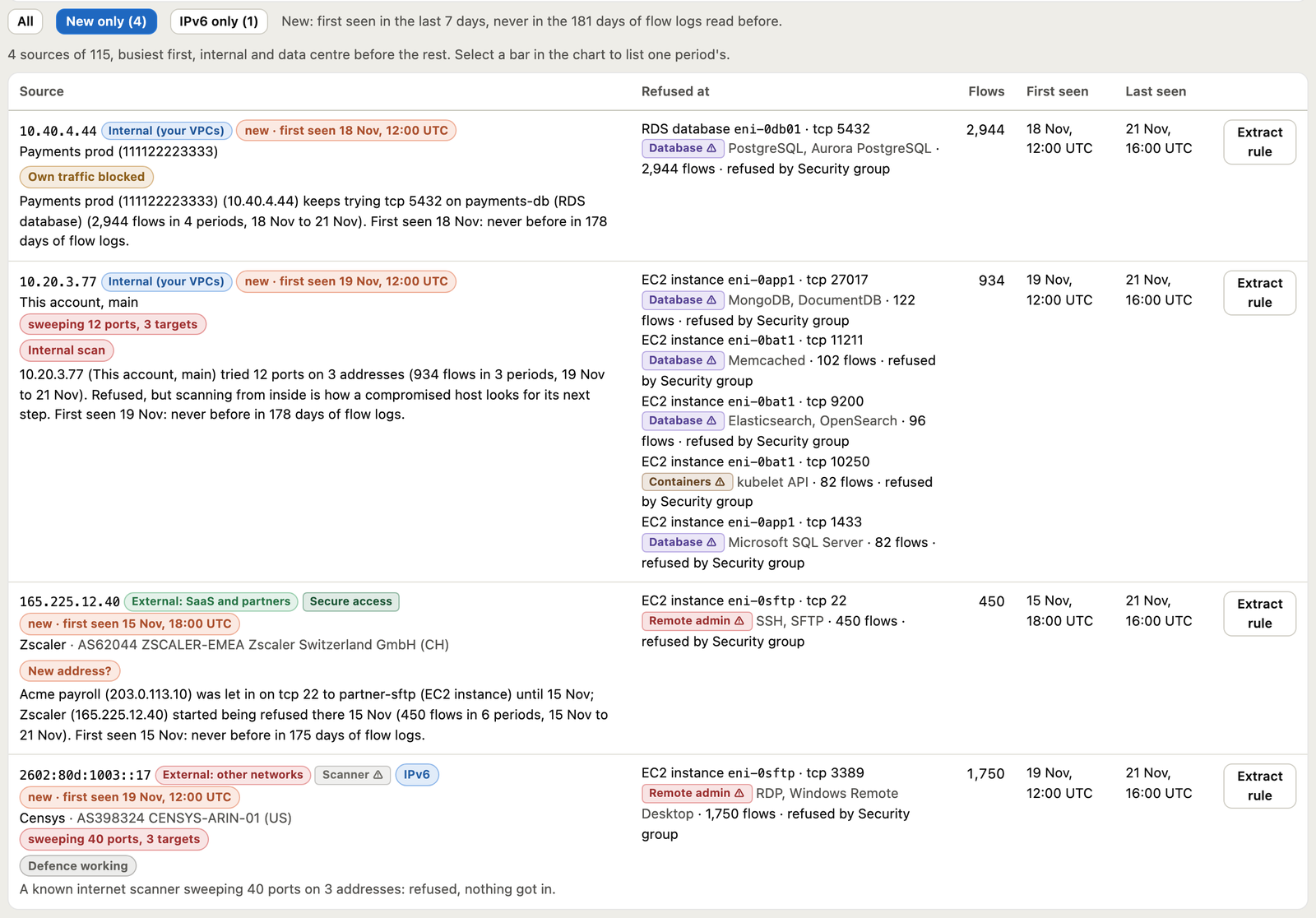
watch reads every 5 minutes and alerts Slack on rejected traffic that needs attention, saying how many sources are new.
It tells you first. It applies when you say so.
Surveillance (the default)
Reads, reviews, plans and change requests all work. Nothing is applied: every write refuses, with the reason. Revert always works.
Enforce
Set per account, with a reason, and only after a permission check has passed. Changes still need a second person to approve them.
The permission check tries every change as an EC2 DryRun call, so SSO permission sets, permission boundaries and SCPs all count, and nothing changes. Apply runs it again first and changes nothing if any call would be refused.
python sg_db.py check --regions eu-west-1 --assets
python sg_db.py mode enforce --account 123456789012 --reason "approved by the change board"
Per account, per group, or per asset.
An asset can get a group of its own, built only from the sources that reached its interface. The interface moves onto the new group; the old groups stay for everything else. Every move is in the asset’s audit trail.
python sg_tightener.py analyse --region eu-west-1 --log-group /aws/vpc/flowlogs --days 30 --out approved.json
python sg_db.py asset-plan    --region eu-west-1 --eni eni-0abc123 --approved approved.json
python sg_db.py asset-propose --plan asset-plan.json --reason "own group for the batch host"
python sg_db.py approve 7       # a second person
python sg_db.py asset-apply 7
python sg_db.py asset-log --eni eni-0abc123
python sg_db.py asset-revert --region eu-west-1 --eni eni-0abc123 --reason "rollback"   # if needed
Auto scaling, EKS and ECS assets are refused: tighten the shared group, and every new instance inherits it.
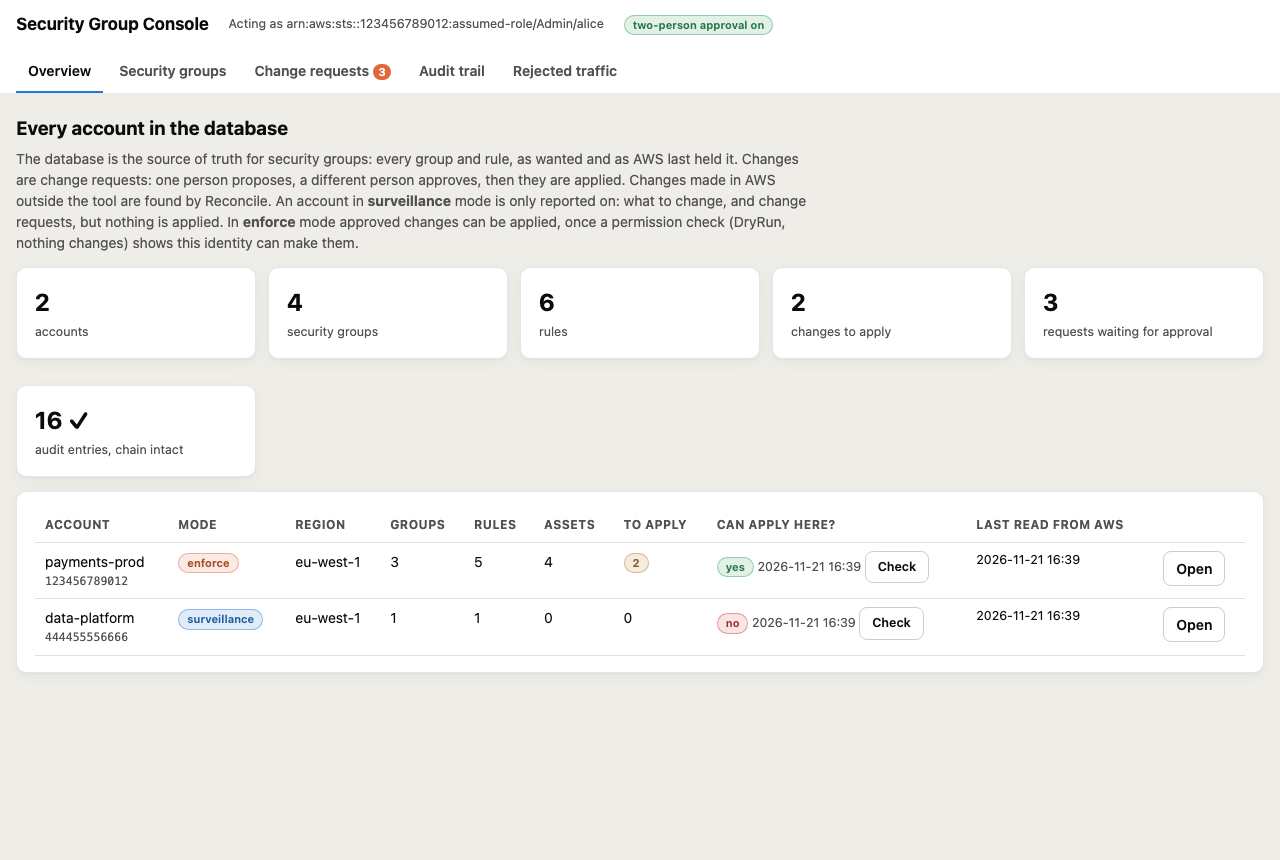
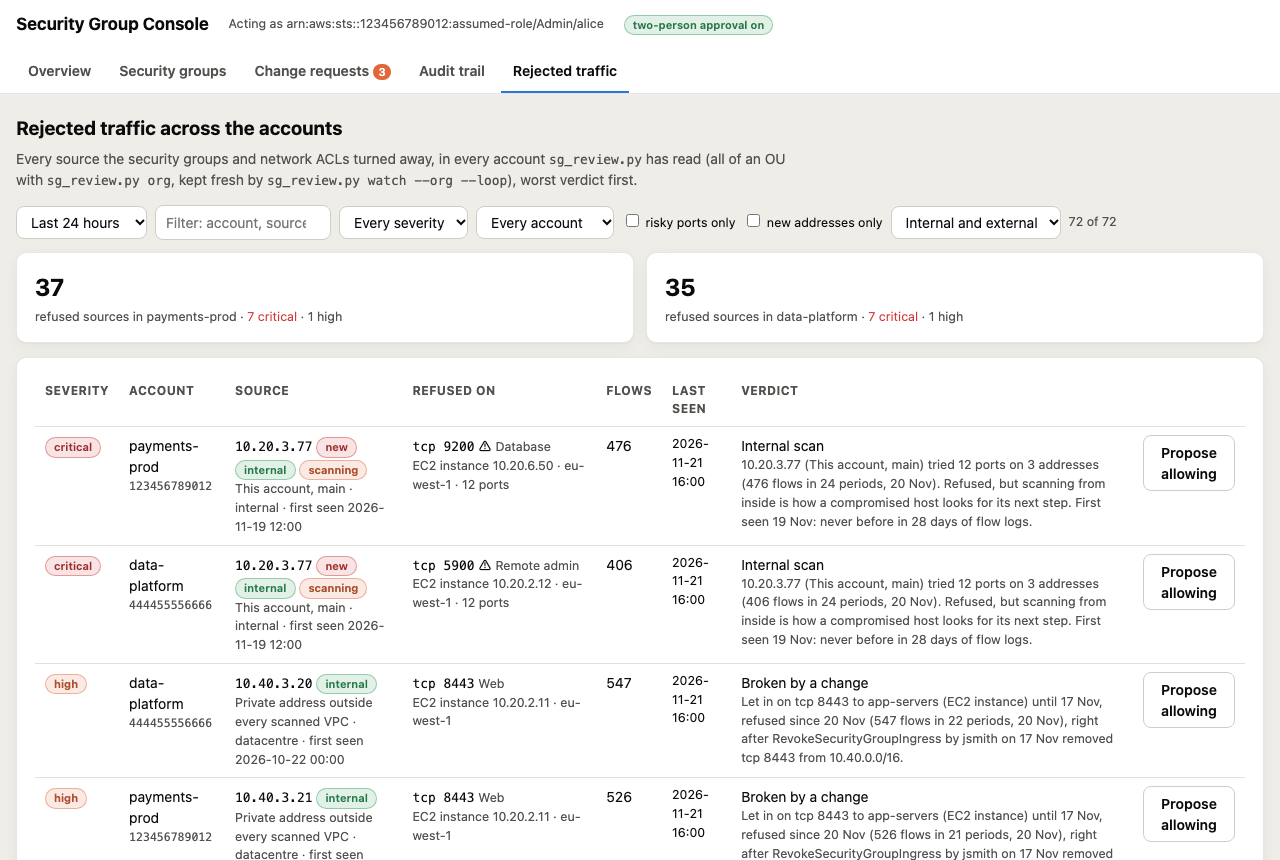
Every account on one local page.
python sg_console.py serve
It listens on 127.0.0.1 only, behind a one-time token. Each account’s mode and permission check, its groups and assets, change requests to propose and approve, the audit trail, and every rejected flow across an OU.
If something is not right.
Apply says the account is in surveillance
That is the default. Run the permission check, then set enforce mode for that account with a reason.
The check says denied
Your role or SSO permission set cannot make every change. The check names each call; add iam-policy-write.json or ask for it. Nothing was changed.
An asset is refused for its own group
It belongs to an auto scaling group, EKS or ECS, or AWS manages the interface. Tighten the shared group instead; new instances inherit it.
The review page is empty
VPC flow logs must be on and in CloudWatch Logs. See the flow-log requirements, especially behind a transit gateway.
Something legitimate is blocked after a change
Revert replays the manifest in reverse. The review marks the change that broke traffic with a red triangle and lists the sources it cut off.
The full documentation, runbook and IAM policies are on GitHub.